

bronxguys02
Known Participant
August 1, 2022
Answered

FM2020 logo in graphic on PDF cover

  • August 1, 2022
  • 1 reply
  • 370 views

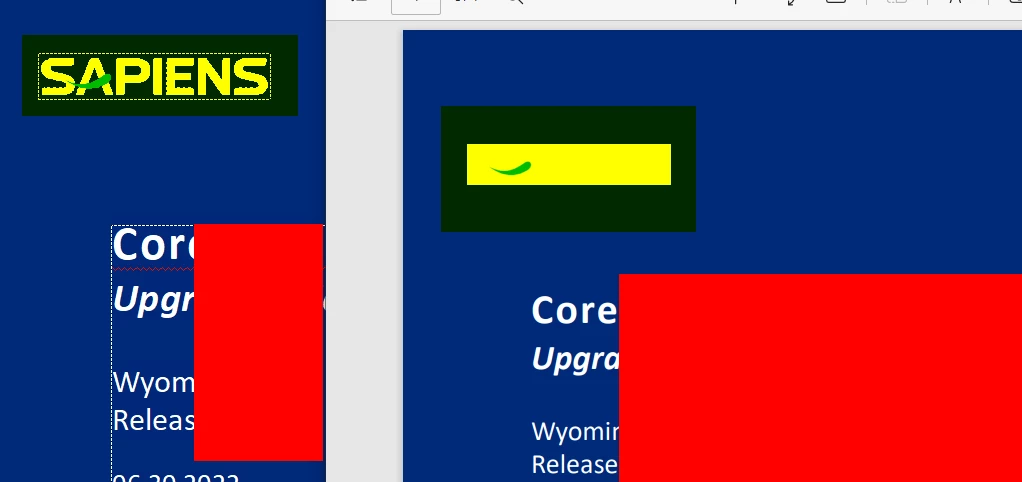
In FM 2020 (version 16.0.4.1062), I am creating a PDF and am stumped why my logo appears as it does in the attached screenshot. I've tried putting the logo on the master page and adding it to the body page, and I get the same result. I'm thinking it must be something with the image itself, which was copied from a Word document. TIA. 


Margaret


)

This topic has been closed for replies.
Correct answer Bob_Niland

What's the graphics file format?

If you haven't been provided a reasonable vector version of that logo, I can show you how to recover one from a corporate PDF (if you have Adobe Illustrator available).

1 reply

Bob_Niland
Community Expert
Bob_NilandCommunity ExpertCorrect answer
Community Expert
August 1, 2022

What's the graphics file format?

If you haven't been provided a reasonable vector version of that logo, I can show you how to recover one from a corporate PDF (if you have Adobe Illustrator available).

bronxguys02
Known Participant
August 1, 2022

I don't have Illustrator, but your question re: file format got me thinking about how I imported the logo. I changed it to .png and it works now. Thank you!

Bob_Niland
Community Expert
Community Expert
August 1, 2022

re: …changed it to .png and it works now.

Great.
Now, depending on the use, you might still prefer a vector format, and that enterprise has one available (it's vector in their 07_corporate-esg_JUL2021_V08-July202021-2200.pdf document).

Further, depending on the output workflow, whatever you use might need to be on a Body page and not a Master page, as MP content (as I understand it) does not flow to HTML/XML or eBook output. If just to PDF or print, no problem.