
Known Participant
November 25, 2021
Question

FM2020 Responsive HTML - Output Image Settings missing vs FM2019

  • November 25, 2021
  • 2 replies
  • 226 views

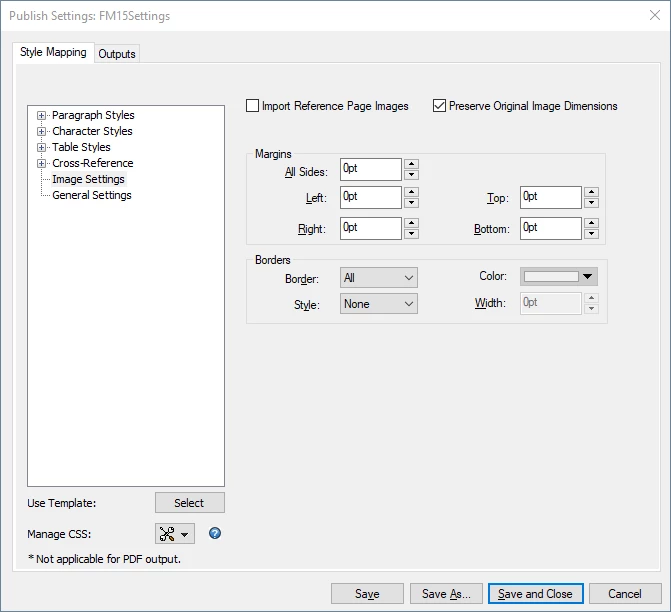
We are moving from Framemaker 2019 to 2020. However, the JPG images in FM2020 output appear in a much lower quality compared to the FM2019 output. Further, the Image Settings are missing or very limited in FM2020 compared to FM2019. See the two settings dialogs below. 


This is FM2020: (ver 16.0.3.979)
 

This is FM2019:
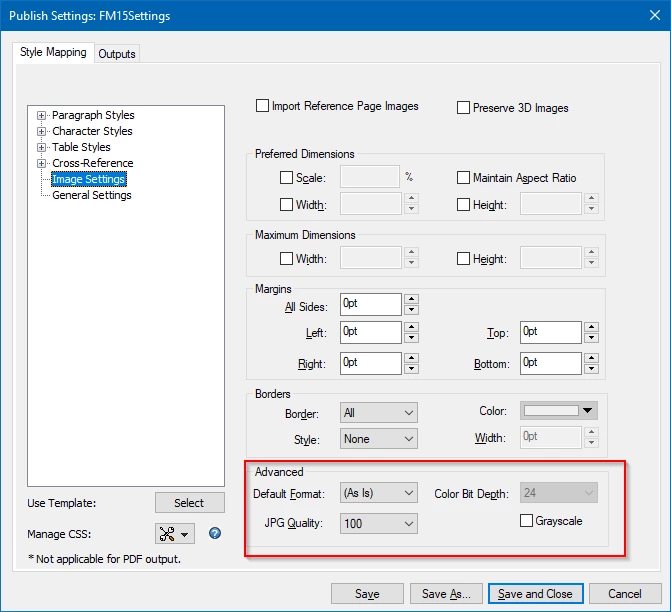
 

Where are these settings in FM2020? I would like to change the JPG Quality value. If there isn't a setting somewhere in the GUI, I was hoping there might be some other configuration settings I can make.


Thanks!


This topic has been closed for replies.

2 replies

Community Manager
November 30, 2021

In older versions before 2020, web-compatible images like JPG were converted during HTML5 output generation and new image files were created. This resulted in a loss of quality and slowed down the output generation process.


Based on strong requests from many users, we have changed this in the 2020 release. In the 2020 release, all web-compatible images (like JPG, PNG, and GIF) are just copied to the output folder without any conversion or modification. As there is no longer any conversion happening, these settings are no longer there.


Can you explain a little bit more what differences in quality you see?

Jeff_Coatsworth
Community Expert
Community Expert
November 30, 2021

Sorry, no idea - I suspect you'll need to reach out to the FM support folks - see https://helpx.adobe.com/contact/enterprise-support.other.html#framemaker for your Adobe Support options. I'd recommend using the tcssup@adobe.com e-mail address as it reaches a team dedicated to Technical Communication Suite products including FrameMaker.