January 2, 2013
Question

FM8 Login Problem - Like FM10?

  • January 2, 2013
  • 3 replies
  • 864 views

Apparently the problem is not limited the FM10. I am running FM8 (fully patched) on Windows Vista (also fully patched) and received the following this morning when trying to start FM.
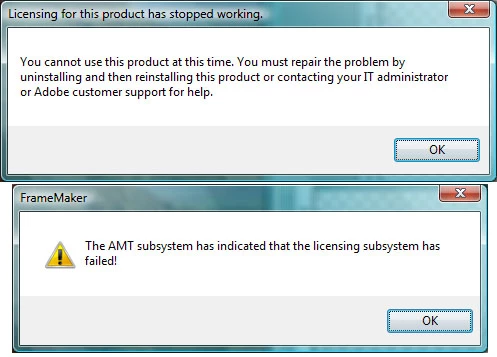
I tried the date reset to 2012 that worked for FM10 but it didn’t work for my FM8.

I’m an independent contractor at an account and my installation disks are at home. I’m nearing retirement and don’t want to invest in upgrading FM. Any help is appreciated.

    This topic has been closed for replies.

    3 replies

    Bob_Niland
    Community Expert
    Community Expert
    January 2, 2013

    > ... and my installation disks are at home.

    How long does Frame have to work before you get home?

    If 30 days or less, download & install the trial version of FM11.

    When you get home, uninstall all, and reinstall FM10.

    Be careful about the PDF stuff, as those components of FM11 T can wreck an Acrobat Pro.

    January 2, 2013

    Thanks Error. Just today - I can work on images until then

    January 3, 2013

    Well, got home, uninstalled FM and all patches, rebooted the computer and reinstalled. FM8. Same problem. Will contact customer service. I'll follow up here if/when resolved.

    Arnis Gubins
    Inspiring
    January 2, 2013
    January 2, 2013

    Thanks for the info Arnis. I'll try the reinstall tonight (a wasted day at work - groan).

    Arnis Gubins
    Inspiring
    January 2, 2013

    I've tried FM8 & FM9 on XP and Win7 (32- & 64-bit) platforms and they all load without a problem. FM10 is now working after applying the first patch that Adobe put out.

    I suspect that it may be a spearate issue in your case and that there has been some corruption that is affecting the licensing component of your installation. This error has also been reported by Creative Suite users for differring versions, so it appears to be a known malady associated with Adobe's licensing system. Try a re-install and if that doesn't work, you'll have to contact Adobe support.