


rayk0r
Participating Frequently
May 11, 2016
Question

Foldable TOC

  • May 11, 2016
  • 11 replies
  • 974 views

Hello,

at first, my english isn't that good - I'm sorry but I hope you will understand what I want to say.

I have a big problem with the book function of FrameMaker. I want to creat a table of contents which is foldable. I have NO idea how to do that. I tried (felt) 900 different methods but nothing works. I found a lot of stuff about table of contents but no one explain in a few (easy) steps how to do that. Maybe I do something wrong in the TreeView ... I don't know - really.

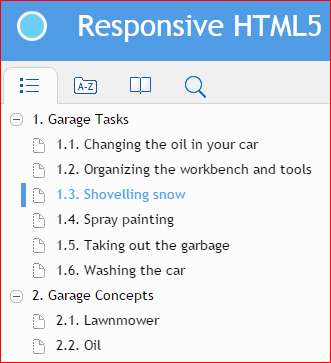
See, this is what I want:
ditaoutput.PNG

As you can see, you can click on "Garage Tasks" and there are more subjects. If you won't see these more subjects, you can click on Garage Tasks - again - and it will be hidden.

This is what I want and I would be so thankfull if you could give me a short "how to do"-list, step by step.

Thank you very much,

Ray

This topic has been closed for replies.

11 replies

Jeff_Coatsworth
Community Expert
Community Expert
May 11, 2016

So are you looking for a TOC that just initially shows "1. Garage Tasks" & "2. Garage Concepts", etc. all collapsed? (Not expanded as you show in your screenshot?)

rayk0r
rayk0rAuthor
Participating Frequently
May 11, 2016

Hello,

expressed in a simple way: I am looking for a solution exactly how it is shown in my screenshot.

I want this "Main-Topic" (Garage Tasks) and then the "Subpoints" (Changing the oil in your car, Organzizing the workbench and tools etc.). I have no idea how I can creat a "Main-Topic" which includes "Subpoints" but I really need this feature because it makes my table of contents much more clearer (in my opinion).

Greetings

Ray

Jeff_Coatsworth
Community Expert
Community Expert
May 11, 2016

Ah, ok - the "1. Garage Tasks" header should be either in your FM book's generated TOC or of a paragraph tag like a Heading 1 or something like that, that you indicate in your Publishing settings to tell FM to pick up all Heading 1's and turn them into topics (it's a pagination setting). I'm not too familiar with FM Publishing controls, so I'm not 100% sure how it's done - I get finer control over my output by importing into RoboHelp.