
Participant
September 11, 2018
Question

Font does not show the Bold weight in FrameMaker

  • September 11, 2018
  • 2 replies
  • 721 views

FrameMaker version: 2017

I recently had to switch to a new font that my organization provided. When I use the font in Word or Robohelp, I am able to change the font style to Bold or Italics. But, the same is not happening in FrameMaker. I checked the properties for the FM paragraph format for which I am using the font, and the Weight for the font does not list Bold nor does the Angle list Italic. It only lists Light.
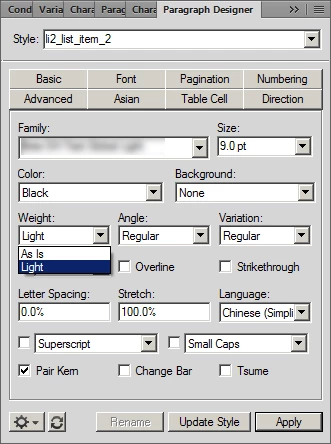
Any suggestions as to why this might be happening?

This topic has been closed for replies.

2 replies

barbara_a7746676
Community Expert
Community Expert
September 13, 2018

Word is able to use "computerized" bolding when the bold font style is not installed on the computer. When using FrameMaker, the bold style of the font must be installed on your computer.

Bob_Niland
Community Expert
Community Expert
September 13, 2018

re: When using FrameMaker, the bold style of the font must be installed on your computer.

FM can synthesize a "Bolded" in some situations. If I recall correctly, it required Type1 font, and that the current printer instance be Postscript-like (which would include Distiller or PDF writers).

Don't know if this is still true for typical modern Unicode fonts or OpenType generally.

In any event, reliance on synthesized fonts (including the Adobe MultipleMaster fonts of yore) is a stewardship problem. Some future document maintainer will sail into the forum trying to puzzle out a missing font dialog.

Matt-Tech Comm Tools
Community Expert
Community Expert
September 11, 2018

It sounds very much like you only have the Light version of the font installed.

Check Windows, or the font files you were provided. Did you install the fonts you want on your system?

-Matt

-Matt Sullivan, FrameMaker Course Creator, Author, Trainer, Consultant
Participant
September 18, 2018

Yes, that seems to be the problem. We have been provided with just the Light font. Not the bold and italics font.