


Font Issue Converting from Framemaker 7.2 to 12.0
I'm in the process of converting files from Framemaker 7.2 to 12.0. Everything has gone fairly smoothly, except for the following font issue.
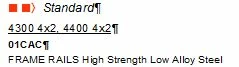
I have a character tag that uses Zapf Dingbats (named Dingbats 1655). It is then used in my paragraph tag (h2 head2), where the Autonumber code is set as: n n/t (n=the box symbol in Zapf Dingbats with a space between the two, the t for the tab). This gives me the double box for the h2 head2 paragraph tag (see below from Framemaker 7.2 layout).
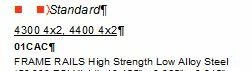
When I open the file in Framemaker 12.0, it displays as below (with extra spacing between the two boxes). The character tab and paragraph settings are identical to 7.2:
However, if I act like I'm printing to a .pdf in Framemaker 12.0 (changing from my default copier to the .pdf setting, and actually "print" a page as a .ps or .pdf), it miraculously "fixes" the issue and appears on screen like it does in 7.2:
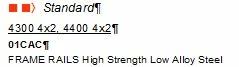
Am I to assume there is now an issue with my default printer (local shared copier) based on the fact that the appearance changes when a .pdf option is selected? How would I fix this? It's only an issue with the Zapf Dingbat font (Type 1 font) and I can't figure out why there would be a difference when it works in 7.2.
Regardless, I can work around it as mentioned above, but it's cumbersome and irritating to trick it everytime I work on a book (as h2 head2 is used in all 13 of the books I work on). Thoughts?
 AdChoices