

Community Expert
June 8, 2022
Question

Footnote mystery

  • June 8, 2022
  • 6 replies
  • 503 views

I am designing a new template and have stumbled upon a a small "mystery".

If I create a new blank document in FrameMaker 2020, write some text and add a footnote, I am going to get an option to add some footnote text in the bottom of the page. It is going to look like this:
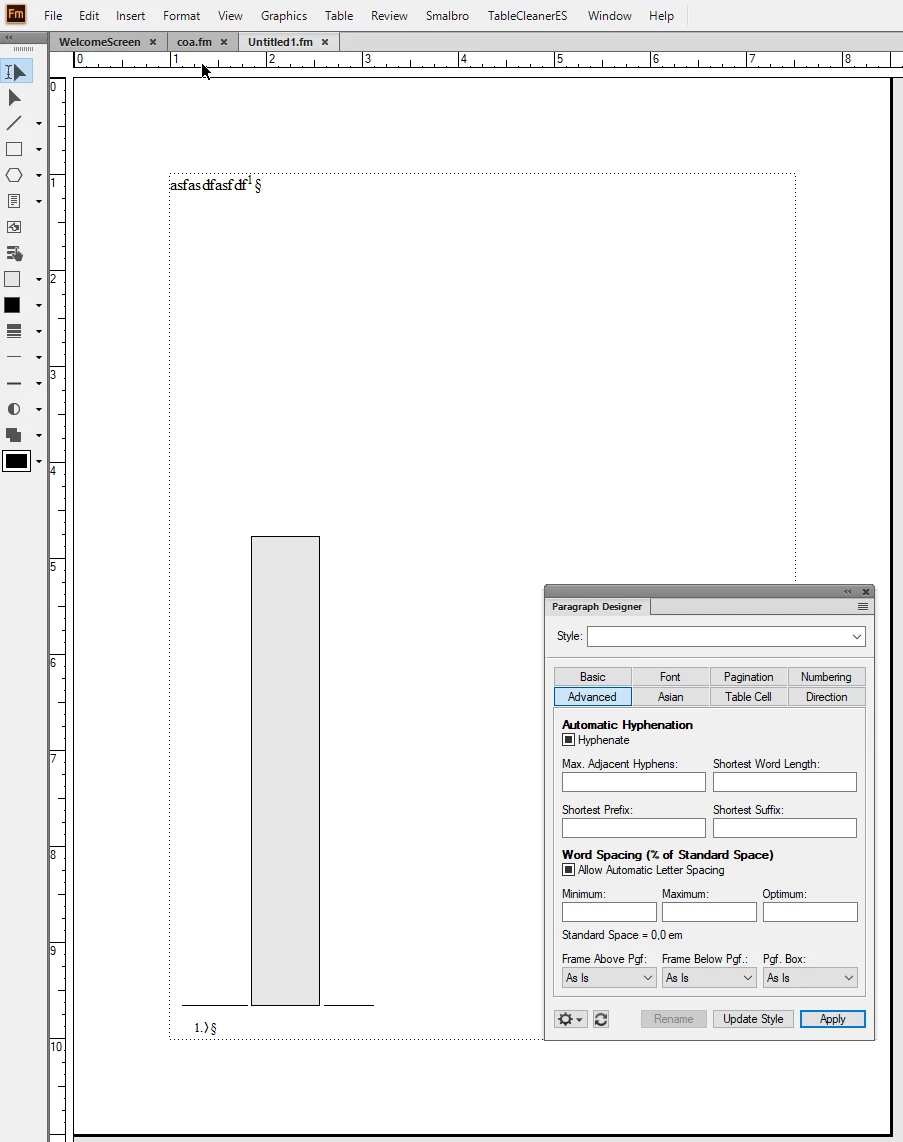
I have added a grey rectangle to show where the line above the footnote text is. If we look in the Paragraph Designer no line has been assigned to the Footnote paragraph. So how does the formatting work? Where does the Footnote paragraph style get the line from?

If I assign the proper line to the Footnote paragraph in the dropdown., this happens:
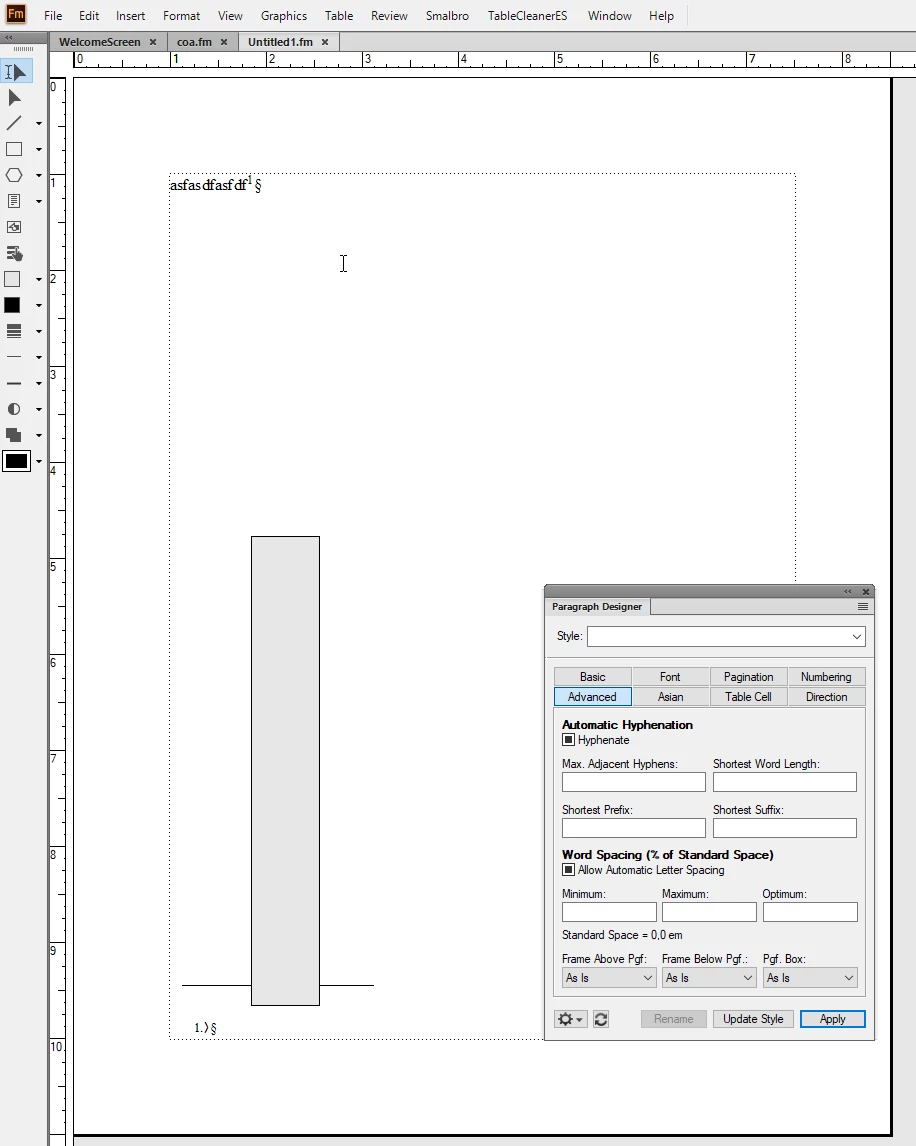
Now I have proper control over the line but the line suddenly jumps up from its previous position.

This behaviour is a bit odd. Why is the footnote line not assigned when the footnote marker is inserted and the paragraph created? ....


    This topic has been closed for replies.

    6 replies

    Barb Binder
    Community Expert
    Community Expert
    June 8, 2022

    Hi Klaus:


    I wish I didn't know as much about footnotes as I do. I deal with more footnotes (both in InDesign and in FrameMaker) on a daily basis than any normal human should ever have to. I can tell you though, that you can use custom names for a footnote style—you just have to:

    • Create a custom style name,
    • Edit Footnote Properties to reflect the new style name,
    • Manually assign the new style to the footnotes (the new ones will know what style to use), and
    • Edit the frame name on the reference page to exactly match the paragraph style name.


    If they all match, then it still works as explained above.


    ~Barb

    ~Barb at Rocky Mountain Training
    Barb Binder
    Community Expert
    Community Expert
    June 8, 2022

    It's funny, Bjørn, I'm just the opposite. I've worked with footnotes (and taught footnotes) for so long, that I just accepted how they are pre-assigned as a fact and never gave it another thought, until today. I think it's why it took me so long to drill down to your actual question. 😊


    The position is supposed to be controlled by the size of the reference page frame. 

    But, position is controlled by the size of the reference page frame, just like the other reference page frames. I made the frame yellow, for easier tracking.


    ~Barb

    ~Barb at Rocky Mountain Training
    K.Daube
    Community Expert
    Community Expert
    June 8, 2022

    Thank You Barb for your exhaustive explanations! 25 years i had the same understanding problems as Bjørn has - until I experimented with an own footnote ¶ format zfn-footnote and ztf-table-footnote...  

    Barb Binder
    Community Expert
    Community Expert
    June 8, 2022

    Hi Bjørn:


    This is what I'm trying, unsuccessfully so far 😊, to explain. The footnote rule assignment is not handled through the Paragraph Designer — if it was, the line would appear above every single footnote on a given page. My docs are footnote intensive, so I might have 10 footnotes on a given body page, and I only want one line.


    Using the footnote feature, the Footnote frame is automatically assigned to only the first footnote on a page. Users aren't involved in assigning the Footnote frame or the TableFootnote frame—FrameMaker does it for us.


    ~Barb


    Edit: To illustrate why we don't want to get involved in adding a Rule Above in Paragraph Designer:

    ~Barb at Rocky Mountain Training
    Community Expert
    June 8, 2022

    Damn - I have used FM for so many years but never really looked into this. ... but still... wouldn't you expect the position of the frame to be the same? (automatically vs assigned) The position is supposed to be controlled by the size of the reference page frame. 

    Bjørn Smalbro - FrameMaker.dk
    Barb Binder
    Community Expert
    Community Expert
    June 8, 2022

    Hi Bjørn:


    Since I'm still sitting here, I'll take a stab at your follow-up question. Klaus can come back and elaborate if I fall short.


    The Footnote paragraph style is a default in any new document—it's part of the starter set in the Paragraph Catalog that includes Title, Heading1, Heading2, etc. In Footnote Properties, that Footnote style is pre-assigned to all footnotes, current or future. The Footnote style is associated with the Footnote frame on the main reference page.


    What this means is that whenever you add a footnote, FrameMaker automatically assigns the Footnote style to the footnotes, and that includes adding the footnote frame from the reference page above the first footnote on all body pages.


    ~Barb

    ~Barb at Rocky Mountain Training
    Community Expert
    June 8, 2022

    Hi Barb. Yes, I get that. ...

    But try this:

    • Create a  new blank document.
    • Write a line and add a footnote. Now FrameMaker is going to create a blank line for you on the bottom of the page with a style called "Footnote".
    • Now take a look at the Advanced properties of that style. In the field "Frame Above"... does it have a Footnote line assigned?
    Bjørn Smalbro - FrameMaker.dk
    Barb Binder
    Community Expert
    Community Expert
    June 8, 2022

    Hi Bjørn:


    Just to elaborate on @K.Daube's correct answer... the footnote rule resides in a frame called Footnote on the main reference page. You can manipulate the rule, which is obvious to most people once they find it, but the frame it is in is equally important. That frame is physically sitting (invisibly) above the first footnote on each page. You can move the line within the frame, but also adjust the frame height to control the spacing


    You'll notice there's another frame on the reference page called TableFootnote. It doesn't have a rule inside. It's only job is to control the space below a table and the first table footnote.


    ~Barb 

    ~Barb at Rocky Mountain Training
    K.Daube
    Community Expert
    Community Expert
    June 8, 2022

    Bjørn,

    The ominous line is defined via Format > Document > Footnote Properties. You define the paragraph format for the footnote there (default is "Footnote"). The line is defined on the reference page in a frame named similiar (Footnote). For the benefit of the user a graphical text above that frame lists this name (but this can be a fake...).

    See https://www.daube.ch/docu/files/compendium.pdf#page=265 and 266

    Community Expert
    June 8, 2022

    Not sure I understand you here @K.Daube . What I am wondering is... If I create a blank new document and insert a footnote, FrameMaker creates a paragraph format for me called "Footnote". This footnote format does not have a footnote graphic assigned under Paragraph Designer -> Advanced ->Frame Above. Never the less, it DOES display the graphic from the Footnote frame on the reference pages.  But when I assign the graphic in Paragraph Designer -> Advanced ->Frame Above the line suddenly shifts position upward. I would expect the line to be assigned when FrameMaker creates the paragraph format in the first place? ... Am I misunderstanding something?

    Bjørn Smalbro - FrameMaker.dk