
Participant
June 5, 2024
Question

For Font "DigitFonteN" letters V, W & K are appearing as question mark (?) in FrameMaker 2022

  • June 5, 2024
  • 2 replies
  • 392 views

Hello Adobe Community,


I am facing the error of font for "DIgitFonteN with letters V, W and K, so when i entered these letters with DIgitFoneN suddnely these get convert into question mark (?) attached the snap.
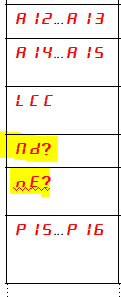
 

Could you have a solution for it to integrate these letters and fulfil the docs requirements.


Thanks

Shiddalingeshwar 

    This topic has been closed for replies.

    2 replies

    Bob_Niland
    Community Expert
    Community Expert
    June 5, 2024

    re: DIgitFonteN

    Have you a link to where this font may be downloaded, so that forum members can try it?

    Usually "?" means either:
    a. the legacy overlay, Unicode BMP (up to U+FFFF), or Unicode PUA font has no glyph for the codepoint, or
    b. it's a Unicode SMP font (U+10000 or above), which does not work in FM yet at all

    In this case, the "with letters V, W and K" suggests that this is a legacy overlay/codepage font, and not a particularly thoughtfully populated one.


    If I had a requirement for 7-segment or dot-matrix digits, I'd be inclined to find a Unicode font that placed them in the usual U+0020…007F (ASCII) range, at their expected glyph locations, or in the U+FF** fullwidth range.

    Bob_Niland
    Community Expert
    Community Expert
    June 5, 2024

    Of course, in a dot or bar font with sufficiently simple geometry, some letterforms simply can't be done unambiguously. 

    In a 7-segment, I'm not sure how one might diferentiate U&V, K&H, or how to implement W at all. The font designer may have left them out deliberately.

    Community Expert
    June 5, 2024

    Hi, does this font work in other applications? Is this a Unicode font? Can you check which characters are supported?

    Best regards, Winfried

    Participant
    June 5, 2024

    Hi,

    I have not tried whether this DigitFonteN font works in other applications or not.

    But I tried in MS office applications (Word, Excel and Powrpoint) this DigitFonteN is not functioning for V, W and K letters.

    Unicode font is not available within the software. So, I am unable to check this.

    Thanks for the support

    Best Regards,
    Shiddalingeshwar

    Community Expert
    June 5, 2024

    When you applied this font in Word and you did not get the characters V, W or K, then this seems that these characters are not available in this font.

    You can check the available characters in BabelMap (free):

    https://www.babelstone.co.uk/Software/BabelMap.html