Inspiring
March 19, 2021
Answered

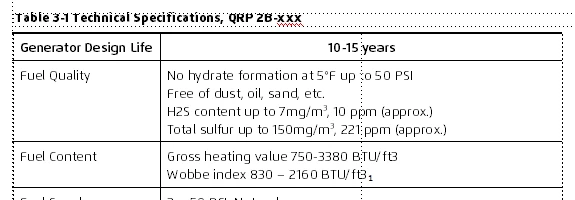
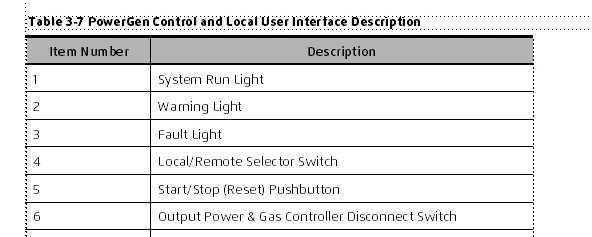
Format B tables some with a shaded heading and others do not

  • March 19, 2021
  • 3 replies
  • 404 views

I have Format B tables. Some have a shaded heading and others do not. All use a paragraph tag named cellheader. How can I figure out why some are shaded and some are not?


    This topic has been closed for replies.
    Correct answer Barb Binder

    Linsims: How do I make that added row at the top a header row? (The top row was indeed a body row)


    Hi Ken:


    https://www.rockymountaintraining.com/adobe-framemaker-need-repeating-heading-rows/


    ~Barb 

    3 replies

    Bob_Niland
    Community Expert
    Community Expert
    March 19, 2021

    Try Custom Ruling & Shading: From Table
    If they still aren't shaded, a common reason is that the heading row isn't (actually a heading row), but is just a body row to which heading styles have been applied.

    Barb Binder
    Community Expert
    Community Expert
    March 19, 2021

    Hi Ken:


    I also use Rick's TableCleaner plugin because I deal with large numbers of tables, but this post expains how to remove overrides on table at a time:

    https://www.rockymountaintraining.com/adobe-framemaker-removing-table-overrides/


    ~Barb 

    ~Barb at Rocky Mountain Training
    LinSims
    Community Expert
    Community Expert
    March 19, 2021

    There are two possibilities here.


    1. The unshaded row at the top is actually a body row pretending to be a header row, and is not actually a header row.

    2. The unshaded row at the top is a header row but someone applied custom shading.


    To figure out which it is, add a bunch of rows at the bottom of the table to see if the unshaded row carries over.


    If the first row carries over to the next page, it's a header row that had a custom shading applied. Highlight the whole row, press Esc-t-x (or click Table > Custom Ruling & Shading), then deselect Custom Ruling Style, Select Custom Cell Shading, then select From Table for both Fill and Color.


    If the first row doesn't carry over to the next page, it's really a body row and not a header row. Press Esc-t-a and add a row to the header, then cut and paste the contents of what you thought was a header row into the newly created header row and delete the empty row.


    If you have a lot of tables like this, I would suggest purchasing Rick Quatro's TableCleaner plugin, which can, amongst other things, autoconvert body rows to header rows and remove custom ruling and shading from all the tables in a document at once, instead of one by one. It's $39, and I find it to be a lifesaver.

    Inspiring
    March 19, 2021

    Thank you for the detailed information. It is appreciated.

    Inspiring
    March 19, 2021

    Linsims: How do I make that added row at the top a header row? (The top row was indeed a body row)
