


December 6, 2013
Answered

Frame 10 book with multiple files crashing when I change the numbering at the book level.

  • December 6, 2013
  • 2 replies
  • 771 views

I've built a Frame book (Frame 10) with multiple files from a variety of books. The files have text insets and cross references within and across chapters. When I go to set the numbering at the book level - as soon as I click Set on the numbering dialog - Frame crashes and I get an Internal Error 10024, 6382424, 6369627, 6383085. I'm attaching a screen shot.
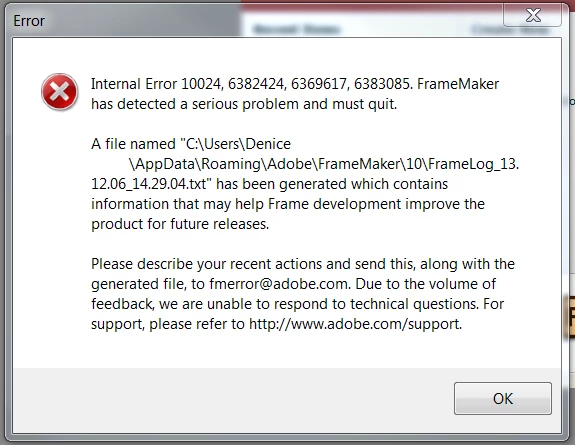
I've take the files out of the book and added them back in. These files worked fine in the original books I copied them from. I can't get the book to number correctly. Please help.

This topic has been closed for replies.
Correct answer iatima

Hi Denice,

Not sure if this is relevant to what you're experiencing but...

I've experienced similar numbering issues with several of my books.

What eventually fixed it for me, is I discovered that some files had paragraph style overrides (not necessarily related to headings or section heads.

Once I removed all overrides from these files, the numbering issues were resolved.

While I use the Paragraph Tools  plugin, You can scan your files for overrides with FM built-in Find/Change.

Regards,

Amitai Sela

Philips Healthcare

2 replies

Bob_Niland
Community Expert
Community Expert
December 10, 2013

> When I go to set the numbering at the book level - as soon as I click Set on the numbering dialog

What happens if you attempt to set numbering from within each component file?

If no crash, you might try doing that for each file, then in the Book, set

  • Read from File

    for every numbering property of every component file.

  • iatimaCorrect answer
    Inspiring
    December 9, 2013

    Hi Denice,

    Not sure if this is relevant to what you're experiencing but...

    I've experienced similar numbering issues with several of my books.

    What eventually fixed it for me, is I discovered that some files had paragraph style overrides (not necessarily related to headings or section heads.

    Once I removed all overrides from these files, the numbering issues were resolved.

    While I use the Paragraph Tools  plugin, You can scan your files for overrides with FM built-in Find/Change.

    Regards,

    Amitai Sela

    Philips Healthcare

    December 10, 2013

    I'm happy to report this worked. I did a search for overrides in the problem chapters - deleted them and re-ran the book. It all seems to be ok. Thank you Amitai!