

jima73697386
Participating Frequently
October 1, 2024
Answered

Framemakeer TOC creation - fm files have workpackage number I need to include workpackage numer with

  • October 1, 2024
  • 3 replies
  • 1446 views

I am creating files that are work packages, each page of the workpackage have page numbers that include the work package number prefix followed by the page number (i.e. 0002-1).

I am using a user variable for the workpackage number in each framemaker file.


I want to create a TOC that includes the work package number with the page number but I cannot get the work package number to generate with the page number into the TOC.


What I want in the TOC is This: 
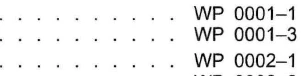
 

What I get is this:

Any help would be great,

Thanks Jim



    This topic has been closed for replies.
    Correct answer Jeff_Coatsworth

    Think you missed this - 'On your reference page add "<$volnum>-" before the page number.' - you have 0001 - <$pagenum> in there.

    3 replies

    Community Expert
    October 2, 2024

    Hi,

    You could use the <$volnum> variable for your work package number.

    On your reference page add "<$volnum>-" before the page number.

    In the book file right-click each file and set the <$volnum> value in the Numbering section. Set the Format to Text. Otherwise FrameMaker will remove the leading 000.

    Then update the book.

    Best regards, Winfried

    jima73697386
    Participating Frequently
    October 3, 2024

    Thanks Winfried,

    That works, with the exception that the volume number is always 0001 in the TOC, even after changing all the file volume numbers to 0001, 0002, 0003, etc.. 


    Any thoughts?


    Jeff_Coatsworth
    Community Expert
    Jeff_CoatsworthCommunity ExpertCorrect answer
    Community Expert
    October 3, 2024

    Think you missed this - 'On your reference page add "<$volnum>-" before the page number.' - you have 0001 - <$pagenum> in there.

    Community Expert
    October 2, 2024

    Looks to me like you are trying to set up a list of effective pages. Barb Binder has an excellent instruction here:

    https://www.rockymountaintraining.com/adobe-framemaker-how-to-create-a-list-of-effective-pages/


    Bjørn Smalbro - FrameMaker.dk
    jima73697386
    Participating Frequently
    October 2, 2024

    Nope, it's a TOC.

    Community Expert
    October 2, 2024

    I believe that you should make a text frame in the workbook chapters on the master pages. Insert the Workpage name and number  on the body page and give the text a paragraph style. Now hide the text frame/text by either making the text white or place a white graphic above the frame. Now you can build the TOC by using non breaking paragraphs to make the page numbers align with the Workbook names and numbers.

    Bjørn Smalbro - FrameMaker.dk
    Jeff_Coatsworth
    Community Expert
    Community Expert
    October 1, 2024

    Can you show us what you've done to get this in the TOC definition?

    jima73697386
    Participating Frequently
    October 1, 2024

    I have this in the TOC reference page.  But this setup does not pull in the user variable with the page number. 

    I am hoping there is a way to get it done. If I have to do something different in the FM files instead of using  a user variable that is okay.  

    Jeff_Coatsworth
    Community Expert
    Community Expert
    October 1, 2024

    I think I would have expected to use some sort of numbering series that structured the chapter number and page number together, which could then be pulled into the TOC. But since don't really care about page numbering in my TOC (I just want the linking) I've not played with it. You might check out Barb Binder's video series on numbering and TOCs.