Matt-Tech Comm Tools
Community Expert
Community Expert
June 25, 2014
Answered

FrameMaker 12 toolbar tomfoolery

  • June 25, 2014
  • 3 replies
  • 668 views

Hi all,

I have an issue in both structured and unstructured Fm11 and 12.

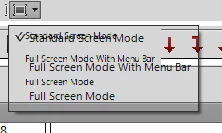
While they've been working quite well on my vmware Fusion 6 vm, in the last week I've noticed a corruption in the menubar and the toolbar.

Here's examples of what I see

Has anyone else encountered/fixed this issue?

    This topic has been closed for replies.
    Correct answer Matt-Tech Comm Tools

    Update: I was able to create another Windows account, which doesn't have the toolbar problem.

    Apparently there's a resource or app I installed that caused the issue in that Win profile.

    Have you tried setting up another user account within windows for testing?

    I'm a bit annoyed with myself, actually, as I should have immediately thought to do this when I saw the issue!)

    3 replies

    Participant
    June 26, 2014

    Yup. I updated to 12.0.2 yesterday and immediately noticed the issue. I contacted Tech Support and they told me that it might be because I was running 2 screens. They told me to disconnect the second monitor, and reinstall FM and the updates.

    The bad news is that I did that this morning, and it didn't solve the problem. I'm on hold with Tech Support again right now.

    Participant
    June 26, 2014

    PS: I am running Windows 8.1 and have no other apps open.

    Jeff_Coatsworth
    Community Expert
    Community Expert
    June 26, 2014

    Yes, I’ve noticed that effect in FM11 when running via RDP to my office Win7 machine. It seems to go sideways when I use the shortcut for applying conditional text (Ctl-Shift 5 or 6 – I can’t remember how it goes). It pops the floating context “pod” and that seems to be enough to make all the window title bar and toolbars go all fuzzy and semi-transparent. Then you can’t really click on anything & I end up exiting out and restarting FM. I just chalked it up to the UI being flakey.

    uakinci
    Inspiring
    June 26, 2014

    Matt, sorry to hear that. I'm using Windows 7 and no problems so far with FM12. Could this be a W8.1 problem?  I remember having somewhat similar "rendering issues" in the past when I had too many resource-hungry apps running at the same time (and not enough RAM). If all fails, I'd uninstall and re-install FM.