


Inspiring
September 16, 2026
Question

FrameMaker 16 Pdf Setup Tag options missing

  • September 16, 2026
  • 2 replies
  • 12 views

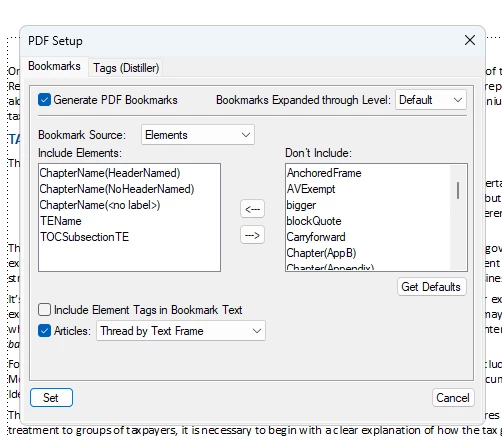
I currently have FrameMaker 16.0.0.754 on my work computer, and the pdf setup dialogue is entirely missing the tags option. I am trying to work to create an accessible document, which is already a difficult issue, but it appears that most of the tinkering that might help me would involve mapping styles to various tags through this setup menu. I am working with a structured FM document, and two years ago when working on the previous edition of this report I was able to access this tag menu on an older version of FM (of which I don’t recall the specific version). 

What are my options for resolving this issue?
 

2 replies

Barb Binder
Community Expert
Community Expert
September 16, 2026

Hi ​@David31602268ox9z:

The current version of 16 is 16.0.10.1162, meaning you are well behind on the patches on 2020.

That said, are you saying that Format > Document > PDF Setup is missing on your version, or just that you didn't know where to look?

If the command is missing from Format > Document, I would a.) update to the current version and b.) make sure View > Menus > Complete is enabled.

~Barb at Rocky Mountain Training
Inspiring
September 16, 2026

 Hi Barb,

Thank you on your response. I will need to work with our IT to get the version upgraded, which may take me some time.

In the meantime, I am saying that the Format > Document > PDF Setup dialogue is accessible on my version, and includes the Bookmarks and Tags (Distiller) tabs, but the section for Tags that are not associated with Distiller is completely missing. I tried to include a screenshot of what is currently being displayed. I checked that the View > Menus > Complete is enabled.