rachelt14433776
Known Participant
March 29, 2018
Question

FrameMaker 17 TOC is Auto-generating an Extra Chapter

  • March 29, 2018
  • 1 reply
  • 289 views

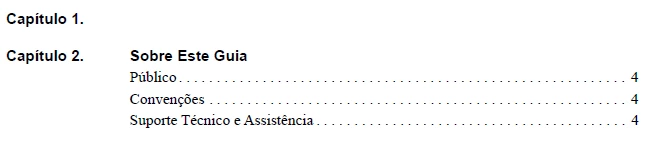
The TOC in FrameMaker 17 is auto-generating an extra blank first chapter. It regenerates even after I delete it. What setting do I need to change to fix this issue?

This topic has been closed for replies.

1 reply

Barb Binder
Community Expert
Community Expert
March 29, 2018

Hi Rachel:

In the TOC, hover over "Capitulo 1" and Ctrl Alt Click to follow the hyperlink to the source file. You have an empty ¶ with the tag being called into the TOC. Delete it, or if you have to have it, tag it as Body, or another paragraph tag that isn't called into the TOC.

~Barb

~Barb at Rocky Mountain Training
rachelt14433776
Known Participant
March 29, 2018

It brought me to the Title page but I don't know what on the Title page is causing the issue. I can't delete anything from there so I'm not sure how to resolve this issue. How to I tag the entire Title page as a body?

Barb Binder
Community Expert
Community Expert
March 29, 2018

Start with View > Text Symbols so that you can see the ¶s. Then click on each line and work your way down to see which one has the wrong paragraph tag. You can see the tag name applied in the status bar (lower left of your screen, above the Windows start menu) or it will be bold in the Paragraph catalog.

~Barb

~Barb at Rocky Mountain Training