



Barb Binder
Community Expert
Community Expert
June 29, 2026
Question

FrameMaker 18.0.0.206: Some files added to book window are immediately producing a "File not found" message

  • June 29, 2026
  • 4 replies
  • 0 views

Hello FrameMaker friends:

I have zero practical experience with version 18.0.0.206 but one of my students is using it.

   After adding files to the book window, FrameMaker pulls in most of the correct content to the generated files but not all. It appears to be random. When we try to troubleshoot a file that we just added by hyperlinking on the partially-generated content, Fm states it can’t find the file and make sure the file exists. We pulled the chapters out and re-added them and am still getting the same message when hyperlinking in. Thoughts?

     [FWIW: This is not a <$paranum> building block issue.]
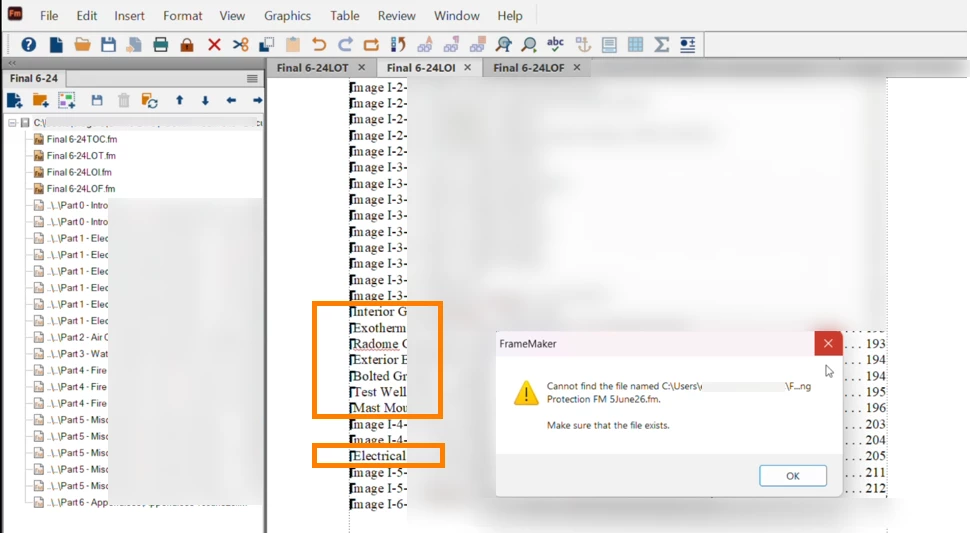
    I’m just back from vacation so maybe it’s me, but I am totally baffled. Is there something off with v18? Or with me?

    4 replies

    Jeff_Coatsworth
    Community Expert
    Community Expert
    June 29, 2026

    Personally, I would set up a new C:\projects\ folder & copy the entire FM project’s folder into there & see if it makes any difference. 

    Barb Binder
    Community Expert
    Community Expert
    June 29, 2026

    Thank you, Jeff! 

    ~Barb at Rocky Mountain Training
    Jeff_Coatsworth
    Community Expert
    Community Expert
    June 29, 2026

    With a location like C:\Users\user_name\{something}\ I’d worry about OneDrive hijacking the storage of the files.

    Barb Binder
    Community Expert
    Community Expert
    June 29, 2026

    I don't recall seeing OneDrive in the full path but this seems worth exploring. If that’s it, would pausing the OneDrive sync be the best way to test it? 

    ~Barb at Rocky Mountain Training
    Barb Binder
    Community Expert
    Community Expert
    June 29, 2026

    Hi ​@Jeff_Coatsworth:

    Ok, it’s to good to know that this isn’t an issue with the version. 

    The files were saved (and showed today’s date). Each file is in a different subfolder but added without issue, and the book updates without errors. It’s very curious.

    ~Barb at Rocky Mountain Training
    Jeff_Coatsworth
    Community Expert
    Community Expert
    June 29, 2026

    Not heard of that one before - anything to do with saving everything before trying to do something to it? Does the location of the files have anything to do with it?