
Known Participant
June 14, 2017
Question

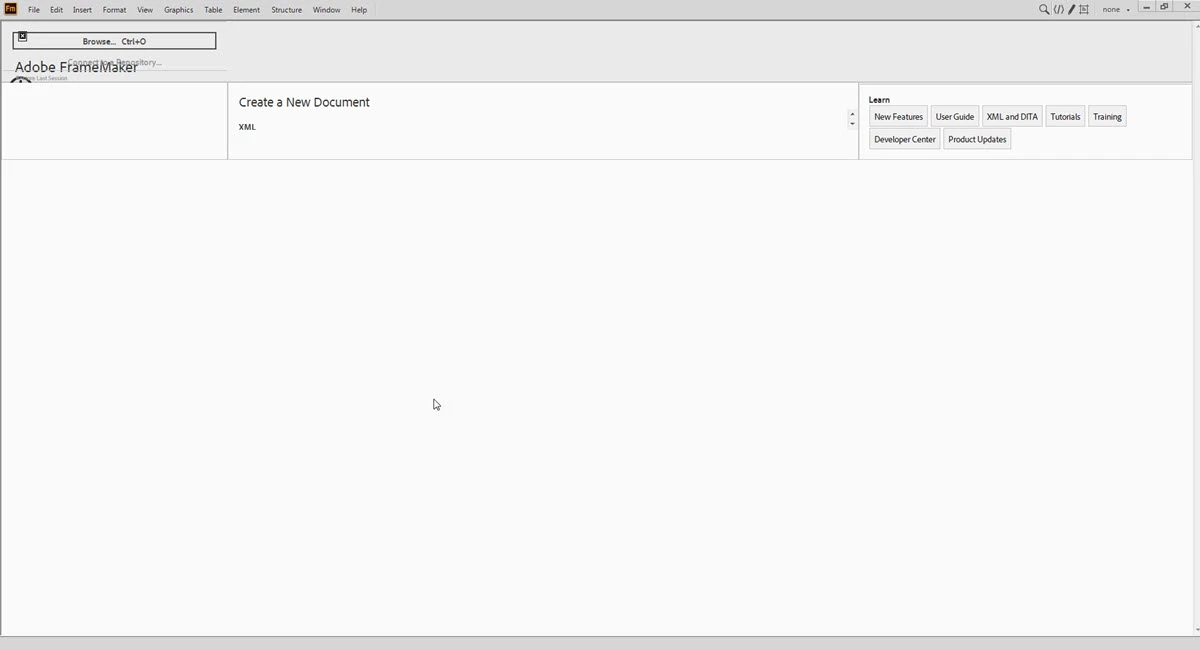
FrameMaker 2017 Welcome screen

  • June 14, 2017
  • 8 replies
  • 1371 views

Hi,

I recently had the Adobe Technical Communication Suite 2017 installed on my work computer. I am using a Windows 7 machine.

When I open FrameMaker, my welcome screen is shown below. I believe it should look different. Are there any settings I can change to have the welcome screen appear as it should?

Thank you!
    This topic has been closed for replies.

    8 replies

    sherryg43654544
    Participant
    September 24, 2019

    This is the exact screen I get.  Any resolution? I could not tell through all the strings on the welcome page issues.   I tried many of the suggestions posted but I am still experiencing this issue on FrameMaker 2019. Others in my group have no issue, so I doubt it is broader issue than my PC. Any new info?

    WJAlisonAuthor
    Known Participant
    June 15, 2017

    Yes, when I open the Welcome.html file, it appears correct in Internet Explorer 11.

    WJAlisonAuthor
    Known Participant
    June 15, 2017

    When I open the Welcome.html file, it appears correct.

    Jeff_Coatsworth
    Community Expert
    Community Expert
    June 15, 2017

    With what browser? Is it working if you use IE11?

    WJAlisonAuthor
    Known Participant
    June 15, 2017

    No the issue is still not fixed. Still searching for another solution.

    Jeff_Coatsworth
    Community Expert
    Community Expert
    June 15, 2017

    Ah, I see that you're using Win7, not 10, so the Edge change wouldn't have anything to do with it. What happens when you try opening up that Welcome.html file outside of FM? Does it appear correct or is it munged up too?

    Legend
    June 15, 2017

    The "edge" flag has nothing to do with the Microsoft browser "Edge". It just forces the latest browser mode of IE.

    For more details, see here:

    Specifying legacy document modes (Internet Explorer)

    WJAlisonAuthor
    Known Participant
    June 15, 2017

    Yes, IE 11 is already installed.

    Jeff_Coatsworth
    Community Expert
    Community Expert
    June 15, 2017

    Did the suggested fix in post#10 of this thread - Re: Welcome screen not displaying properly  - help at all?

    Barb Binder
    Community Expert
    Community Expert
    June 14, 2017

    Is Internet Explorer 11 installed? (It's a system requirement.) If not, install it. Once it is installed, uninstall and reinstall FrameMaker 2017.

    FrameMaker 2017 Truncated Welcome Screen

    ~Barb at Rocky Mountain Training
    WJAlisonAuthor
    Known Participant
    June 14, 2017

    I've applied the updates but still the same.

    Any other suggestions?

    Jeff_Coatsworth
    Community Expert
    Community Expert
    June 14, 2017

    Make sure you've applied all the latest patches - I think there was another thread with a messed-up Welcome screen too.