
Inspiring
March 27, 2020
Answered

FrameMaker 2019 publish to PDF missing all titles, lists, etc.

  • March 27, 2020
  • 3 replies
  • 1815 views

Hello - I'm VERY new to FrameMaker so please bear with me if this is a dumb question. 

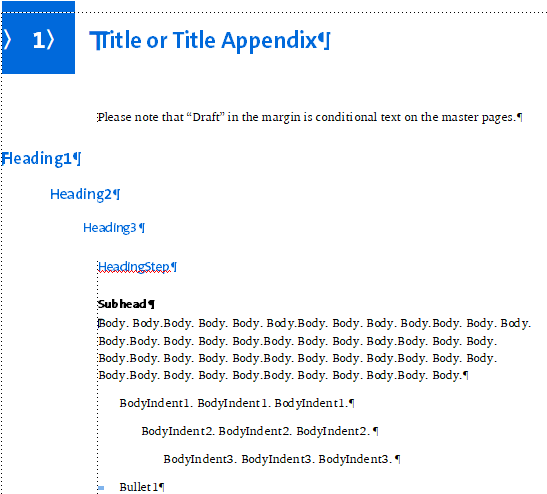
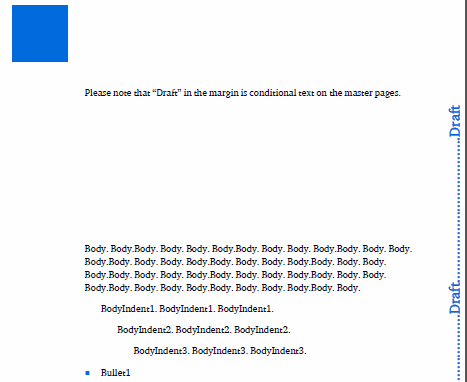
FrameMaker 2019 (Unstructured): When I save as .pdf or publish to .pdf, all of the titles, numbered lists, alpha lists, footers, etc. are missing. 

Here's a screenshot from FrameMaker:
 

Here's the a screenshot of the .pdf output:
 

Any advice is greatly appreciated!!

This topic has been closed for replies.
Correct answer Winfried Reng

Hi,


You get this message because you have switched your printer. This is not a problem.

But your old fonts are the issue.

Can you switch to regular Unicode fonts?

When you check the font in Acrobat, which font is there?

Is the text possibly just white? Can you select something?


When you say you have to re-install your PS font, does this mean that this font disappeared from your hard drive?


Best regards


Winfried

3 replies

Community Expert
March 30, 2020

Hi,


Do you have the latest FrameMaker update? The current one is 15.0.5.838. If not, please update with the Update command in the Help menu.


How do you create the PDF?

Can you change the printer to Adobe PDF? The printer setup is in the File menu.

Then print to a PostScript file (File | Print) and distill this to a PDF.

How does the PDF look like?


Best regards


Winfried

Inspiring
March 30, 2020

Hi Winfried,

I have the updated version of Frame. I've tried creating the PDF by saving to PDF and via the Publish menu.


After printing directly to Acrobat (see below), it seems like this issue is probably caused by a font problem. When I print directly to Adobe pdf, I get this message:

The output looks like this (different file than shown in my original post):

One of the fonts in the doc is True Type (e.g. Charter ITC TT), and one is Postscript (e.g. TheSans-B5Plain). Both fonts display ok in Frame, but when I reboot TheSans disappears and I have to reinstall. The heading in the example above is TheSans, and the body is Charter. I'm on Windows 10, but using Acrobat X (old).


thanks much!

Eloeso

Winfried RengCommunity ExpertCorrect answer
Community Expert
March 31, 2020

Hi,


You get this message because you have switched your printer. This is not a problem.

But your old fonts are the issue.

Can you switch to regular Unicode fonts?

When you check the font in Acrobat, which font is there?

Is the text possibly just white? Can you select something?


When you say you have to re-install your PS font, does this mean that this font disappeared from your hard drive?


Best regards


Winfried

Jeff_Coatsworth
Community Expert
Community Expert
March 27, 2020

Sorry, I don't have FM2019 in front of me right now, but if you're in a hurry to create a PDF, you can print to the Adobe PDF printer instance or do a Save as PDF.

Inspiring
March 27, 2020

Thanks much - I just found the PDF setup menu (in a different place than publish settings for some reason), and looks like I can do the mapping there. 

Jeff_Coatsworth
Community Expert
Community Expert
March 27, 2020

I think you missed telling the Publish settings that you want to include those paragraph tags.

Inspiring
March 27, 2020

Thanks Jeff, I looked through all of the settings, read all of the help (several times) and don't see where to do that...? In Style Mappings, I clicked Auto map paragraph styles, but looks that that does not apply to .pdf.