

LinSims
Community Expert
Community Expert
October 19, 2018
Question

FrameMaker 2019 SVG Image Import Buggy

  • October 19, 2018
  • 2 replies
  • 2231 views

The SVG image is created by combing a screenshot (SnagIt) with text callouts in a Visio file, then exporting to SVG.

This worked fine in FrameMaker 2017.

Now when I import the SVG, almost all the text and lines I added are moved to the right of where they are in the Visio file. The only exception to this is a small piece of text that is not directly on the screenshot. Instead of being on the far right, where I placed it, it is now on the extreme LEFT.

I have created two screenshots using a screen capture of Adobe's Creative Cloud desktop app that is doing the same thing. If anyone has any advice, I'd appreciate it.

BAD:

Original:
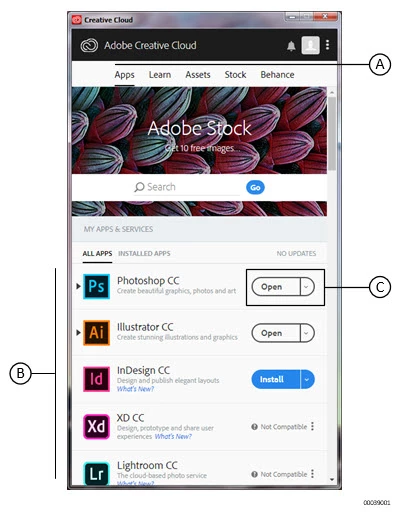
This topic has been closed for replies.

2 replies

Known Participant
March 9, 2019

One of my customers is asking for specific PDF crop marks so I'm currently using the trial version of FM2019, which seems to satisfy the customer requirements. All the FM2017 files I've tested so far have imported with very few problems, however I have several hundred electrical diagrams and waveforms that were produced in Visio and exported as SVGs and most of them get screwed up when imported to FM2019 -- either directly or by updating the existing FM2017 book files.

These illustrations looked very good in FM2017 so I can only conclude that the problem is a result of the changes made to the latest FrameMaker handling.

If this is not rectified it will be a deal changer regarding my decision to upgrade. What's worse, my customer is waiting urgently for these files. Feeling stuck between a rock and a hard place ATM.

Meanwhile, does anyone know of an application that can make a batch conversion of SVG files to something more acceptable to FM2019?

Bob_Niland
Community Expert
Community Expert
March 9, 2019

re: Meanwhile, does anyone know of an application that can make a batch conversion of SVG files to something more acceptable to FM2019?

Adobe Illustrator could probably batch convert them to EPS or PDF. Other apps might be able to do likewise.

If the workflow is to XML, though, it seems a shame to have to resort to that.

LinSims
Community Expert
LinSimsCommunity ExpertAuthor
Community Expert
October 23, 2018

For anyone interested, I have been in contact with Adobe development regarding this issue. I am told that the problem is a bug in the SVG libraries and it affects multiple Adobe products, including Illustrator. The SVG imaging team at Adobe is working on a fix.

Visio is the only program I use to create SVG images, so I am unaware if the issue occurs with SVGs created through other programs. It would be interesting to find out.

Legend
October 24, 2018

If it helps, I can send you a couple of simple .svg graphics (including text) created at a safe distance from Vision; send me a message. En passant, I've often had problems when using ex-Visio .svg in other programs because of all the Visio-specific tagging in the files. Illustrator .svg usually behave, after I clean up the font tags.