
Participant
March 24, 2022
Question

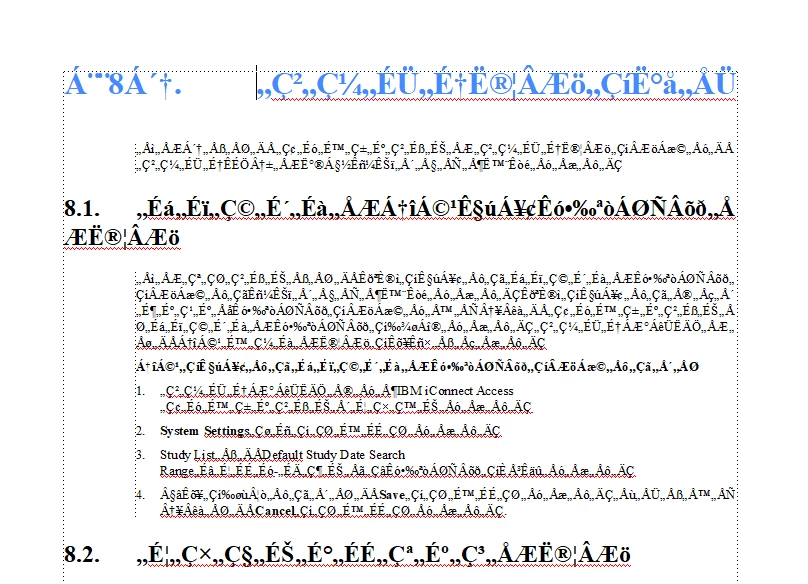
FrameMaker 2020 does not display Japanese and Chinese font characters

  • March 24, 2022
  • 4 replies
  • 610 views
I am having issues with Japanese and Chinese translated MIFs.

When I open the MIFs the Japanese and Chinese characters do not display correctly.

I had no issue when I opened the Italian and Spanish files.

Please help with specific details on the resolution.
 

    This topic has been closed for replies.

    4 replies

    Community Expert
    March 25, 2022

    Did you use this tool?

    http://www.opentm2.org/

    Did you import XLIFF into this tool which you had exported from FrameMaker?

    Or how did you get the FrameMaker content into your tool?

    Which font did you use before the translation and which font do you use now?

    Participant
    March 25, 2022

    Hi Winfried,
    Yes, I use opentm2.
    We uploaded the FXP file to OTM2 and translated it to Japanese and Chinese and then we converted the fxp file to MIF files from OTM2.

    I did the same for other European languages and it worked so perfectly and had no other issues.

    We have issues only in Japanese and Chinese

    Community Expert
    March 26, 2022

    Hi,

    I do not know FXP files. How did you create this file?

    And: Can you answer the font question?

    Which font did you use before the translation and which font do you use now?

    Does OpenTM2 have any options for languages with double byte encoding like Chinese or Japanese?

    Best regards

    Winfried

    Be.eM
    Inspiring
    March 24, 2022

    Which fonts are used to display these files? Do they support Chinese and/or Japanese texts? Is the encoding (unicode) correctly written to file when exporting the translations to MIF? This looks like double-byte text displayed by single-byte fonts.

    Jeff_Coatsworth
    Community Expert
    Community Expert
    March 24, 2022

    Frankly, I would have expected the MIF file to be in ASCII roman characters, but maybe they come in other language fonts too. Did this work before & now doesn't or has this never worked?

    Bob_Niland
    Community Expert
    Community Expert
    March 25, 2022

    JC: … I would have expected the MIF file to be in ASCII …

    MIF (in FM2019&'20, probably in FM8+ generally) supports full Unicode, including SMP characters that FM can't yet render (FRMAKER-10976).


    I've not worked at all with Asian languages in FM, but my top suspect here is that the source document is using some pre-Unicode Asian encoding, such as Big5 (and I never knew how pre-FM8 actually managed to do that, or what it looked like in MIF).


    Next suspect is that it started out as Unicode, and something in the workflow has trashed the encoding.

    K.Daube
    Community Expert
    Community Expert
    March 24, 2022

    How was the MIF created? In which FM version?

    Participant
    March 24, 2022

    Hi Daube,

    The FM files was created from OTM2 software in which we did the translation