
Known Participant
December 23, 2022
Question

FrameMaker 2020 Output to PDF - Background/Transparency Issue... I think :(

  • December 23, 2022
  • 2 replies
  • 489 views

Good day all... I hope everyone is well!
I hope to receive comments/direction to resolve this issue that has appeared since I began using FM2020... from FM2015 (or since attempting to use the Adobe PDF printer).
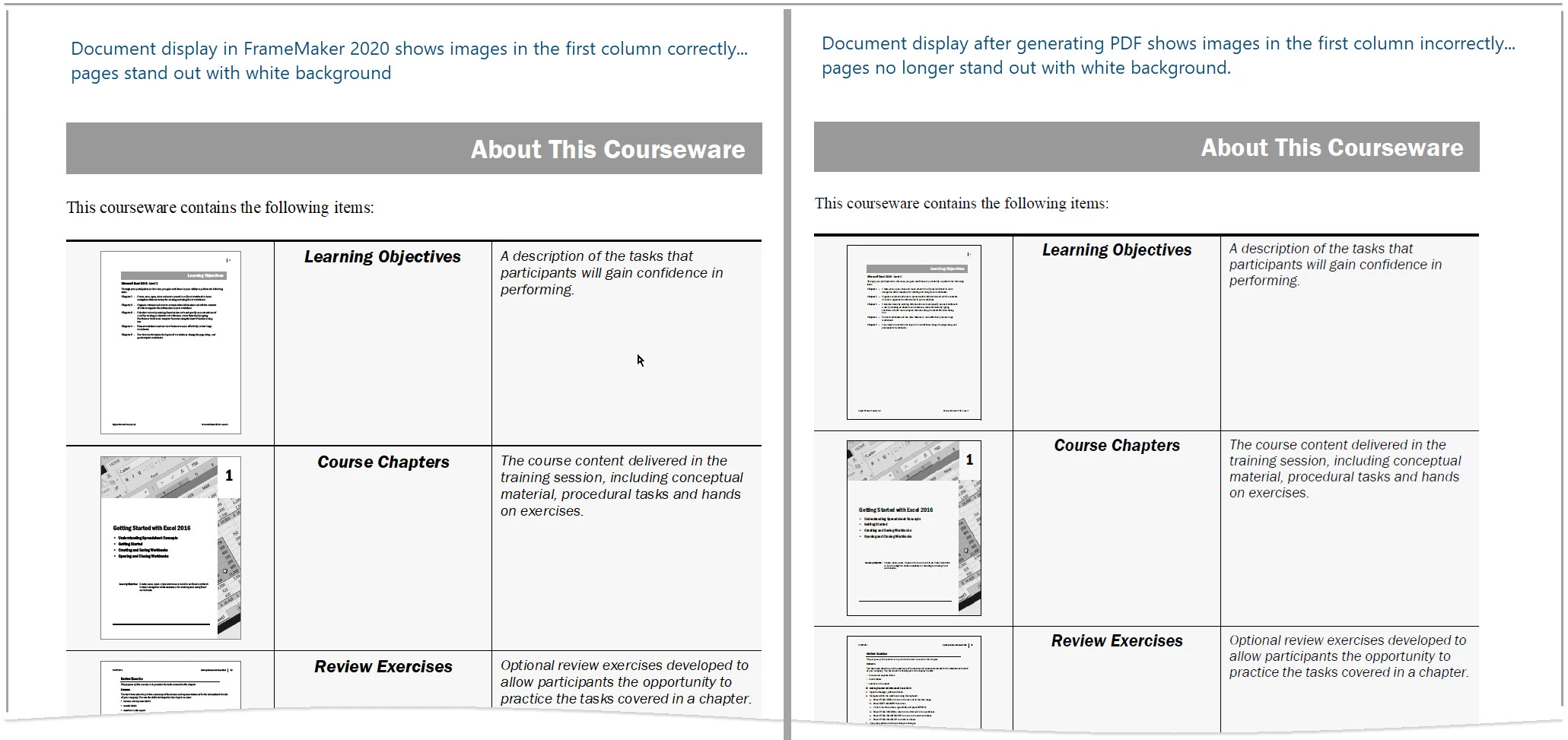
The image below (left side... image of FM2020 doc) correctly displays the thumbnail white pages in the first column... but the image on the right side (output to PDF)... does not display white pages in the first column. That's the issue!

I get the same result whether I "publish" (from the pod), "save as PDF", or "print the book"... and even with different print job settings.

I suspect this has something to do with using the Adobe PDF printer... as historically... we used a printer that didn't support colour... and we'd simply enable Spot Color As Black/White in the Print Document dialog box.
I am looking forward to your comments... all the best to all! 


    This topic has been closed for replies.

    2 replies

    Matt-Tech Comm Tools
    Community Expert
    Community Expert
    December 28, 2022

    I think what you're describing as an issue is actually a "fix" in Fm 2019.

    Improved image transparency was listed as a new feature in Fm 2019.

    Here's a video I did at the time to describe the improved functionality:

    https://www.youtube.com/watch?v=Oowg5mX4LeQ

    See 0:30 for the section on transparency.

    -Matt


    -Matt Sullivan, FrameMaker Course Creator, Author, Trainer, Consultant
    Dean@DCFAuthor
    Known Participant
    December 28, 2022

    Hi Matt... thank you for your comment!
    I saw your video prior to my initial post... and that... coupled with the comments from StudioSm leads me to agree with you. It seems to me then... to solve the "issue" for me... I'll need to use a file format (other than PDF) so those thumbnail images maintain a white background colour. Please let me know if you disagree.

    Thank you again!

    Bob_Niland
    Community Expert
    Community Expert
    December 29, 2022

    Or you can draw a solid-fill rectangle using FM's graphics tools and place it behind the imports.

    Community Expert
    December 28, 2022

    I can't figure out from the wording of your post, what file format the thumbnails has. Are they pdf files which have been linked into the document or are they perhaps in another file format?

    Bjørn Smalbro - FrameMaker.dk
    Dean@DCFAuthor
    Known Participant
    December 28, 2022
    Thank you for reply!!
    Thumbnails are PDF… I tried PNGs but find they are blurry.
    Dean
    Community Expert
    December 28, 2022

    ... when you write that you "same result whether I "publish" (from the pod), "save as PDF", or "print the book"... and even with different print job settings."... Is that the process for creating the thumbnailed files or is it the process for creating pdf files out of the files which have thumbnail pdf files imported?

    Bjørn Smalbro - FrameMaker.dk