
Inspiring
April 4, 2024
Answered

FrameMaker 2022 crashes without error message

  • April 4, 2024
  • 2 replies
  • 1799 views

Since yesterday I have massive problems with FrameMaker 17.0.3 on a Windows 10 laptop.
After doing some operations in the structure view, FrameMaker becomes unresponsive and quits suddenly. There is no error message, no .dmp file, FrameMaker just vanishes from the screen.
I only  found an application error in the windows logs :
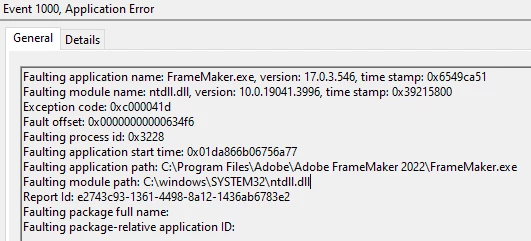
I did a DISM Healthcheck which reported no problems with the windows system files.
Any help appreciated.
    Correct answer Th. Zeisig

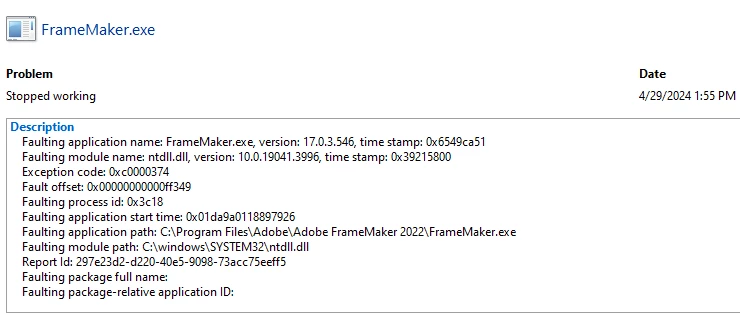
    Update: Looks like that SentinelOne Security agent is the culprit. After deactivating the agent, FrameMaker functions as normal. IT implemented some exceptions to the agent for ntdll.dll and FrameMaker user folder and up to now no crashes (fingers crossed).

    Only thing we see on two Windows 10 and on one Windows 11 machine is a crash when exiting FrameMaker.


    2 replies

    Dave Creamer of IDEAS
    Community Expert
    Community Expert
    April 4, 2024

    I've had a similar problem in the past (not with 2022). Removing and restalling did not work. I ended up using Adobe CC Cleaner to remove Frame complete and then reinstall. Maybe it will help?


    David Creamer: Community Expert (ACI and ACE 1995-2023)
    Inspiring
    April 5, 2024

    Thank you all for your prompt replies.
    @Winfried Reng
    We work with our own structured application based on fm files, so no xml files are involved. And yes the problem occurs with everey file I work with, it is not limited to a certain file.
    I checked the linguistic folder you mentioned, it was empty, I renamed it, but the situation did not change.

    Currently I try with our IT to narrow down the issue, as we have our Scurity package SentinelOne under suspicion as I encouterd a similar situation on Windows 11 workstation with FrameMaker 17.0.3. Here the crash occured after saving the document and closing FrameMaker.
    The exception code is slighltly different from the windows 10 machine but it was thrown by ntdll.dll too.

    Th. ZeisigAuthorCorrect answer
    Inspiring
    April 29, 2024

    Update: Looks like that SentinelOne Security agent is the culprit. After deactivating the agent, FrameMaker functions as normal. IT implemented some exceptions to the agent for ntdll.dll and FrameMaker user folder and up to now no crashes (fingers crossed).

    Only thing we see on two Windows 10 and on one Windows 11 machine is a crash when exiting FrameMaker.


    Community Expert
    April 4, 2024

    Hi,

    I do not know, whether you work with XML files which are converted to FM with an FM template. Or if you start with structured M files. Can you describe this in more detail?

    Do you get this issue with all files or only with a specific one?

    If Framemaker crashes only with a specific file, you could do a MIF wash: Save the FM file as MIF and resave the MIF file as FM file again. This removes any inconsistencies in the document code.

    Sometimes it helps to close FrameMaker and to rename the linguistics folder (c:\Users\xxxx\AppData\Roaming\Adobe\Linguistics\). When you start FrameMaker again, Framemaker will create this folder again.

    And you can describe your issue to this e-mail address: fmerror@adobe.com

    Best regards, Winfried

    Jeff_Coatsworth
    Community Expert
    Community Expert
    April 4, 2024

    The FM crew has been having issues with the fmerror@adobe.com email lately, so I don't know if reporting anything to that address will help. If you need to talk to the FM folks see https://helpx.adobe.com/contact/enterprise-support.other.html#framemaker for your Adobe Support options. I'd recommend using the tcssup@adobe.com e-mail address as it reaches a team dedicated to Technical Communication Suite products including FrameMaker.
    @Th. Zeisig - if this just started happening, I'd look to something in the environment changing - Windows update or new tightening up of IT security (maybe some anti-virus is killing the process).