
Participant
July 10, 2010
Question

FrameMaker 8 dropping text when saved as a pdf

  • July 10, 2010
  • 8 replies
  • 1322 views

This is an inherited project, created in FrameMaker 7. It resides on the client's server and  I access it remotely. I'm using version 8 (have to save it as version 7 before copying it back to the server).

I'm hoping someone who knows Frame FAR better than I ever will can help me solve this irritation; I've invested FAR too many unbillable hours trying to eliminate it.

The book has one chapter that, if I generate the pdf locally in version 8, leaves blank spaces on one page.Just that one page:
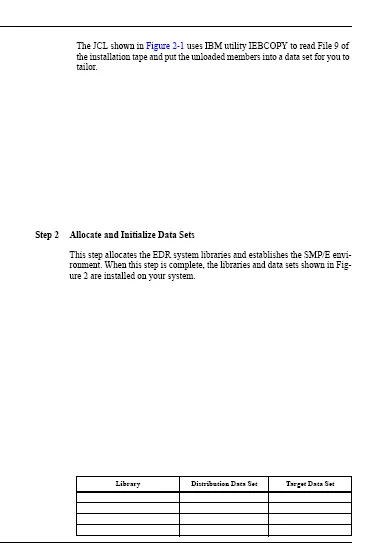
The figure is missing (it's an anchored frame wtih text in it, and I'd just LOVE to know how the original writer formatted the text - inserted tab stops, that sort of thing), the text after Step 2, and the text in the four rows of the table (the table has several other rows on the next page and they display perfectly.

I've tried retyping text in from the end of the prior page and re-entering it on the following page, no love.

When I copy the book back to the server and generate the pdf there, it displays perfectly. Why it should generate perfectly in version 7 and no 8 completely eludes em.

Anyone have ANY clue as to what's happening and how to cure it? I can generate the pdf from the server, so it's not - yet at least -  but eventually it WILL come back to bite us in the you-know-where.

Thanks!

Jo Byrd

    This topic is closed to new replies. Start a new post to keep the conversation going.

    8 replies

    Inspiring
    July 12, 2010

    One other thing to try: in the PDF Setup dialog box, Tagged PDF tab, de-select the Generate Tagged PDF checkbox.

    Shlomo Perets, http://www.microtype.com

    FrameMaker/TCS training & consulting

    Known Participant
    July 12, 2010

    Well, deleting the file didn't help, BUT!!! Shlomo's suggestion did! When I generated the chapter, and then the entire book, the missing text magically appeared. YES!!!!!!!!!!!!!!!!!!!!!!!!!!!!!!!!!!!!!!!

    Sheila, I have NO clue as to the service packs on the server. We're both running XP, mine's XP Pro, I assume theirs is, too. I've never checked to see what printer is set as the system default on the server. Thanks for the suggestion, I want to check it out.

    Thanks, everyone, for your help. This was driving me NUTS, if nothing else, just on principal. And I'm making notes, next time the client wants their documentation, I'm not going through this again!

    Jo Byrd

    July 11, 2010

    Have you double-checked what fonts are being used in the "otherwise missing" text when the PDF is generated on the server? When you generate on the server, what printer is set as the system default, as compared to your local system. Also, what O/S and service packs are on both systems?

    Sheila

    Be.eM
    Inspiring
    July 10, 2010

    Jo,

    the first thing you should do is installing the MS hotfix for exactly this problem: http://support.microsoft.com/?id=952909

    Chance is 99.8% (rough guess) that your problem is solved then.

    The origin of your problem is (most likely) a large number of fonts installed (probably some CJK fonts among them), and a system file (fntcache.dat) which can't handle the size/number without the patch.

    Bernd

    Edit: This fix really should make it into the FAQ. On top position...

    Participant
    July 11, 2010

    Thanks for the suggestion. I'll definitely check it out. I'll let you know if it works (and your's truly will be just tickled pink. A very pretty, becoming shade of pink).

    Known Participant
    July 11, 2010

    Sigh. You don't get to picture me a pretty shade of tickled pink after all. I downloaded and installed the hotfix, but no love. Any other suggestions?

    Thank you for the suggestion. I appreciate you taking the time to respond.