


Participant
January 31, 2013
Question

FrameMaker 9 - Internal Error 9004, 6921628, 9677518, 0 when launching

  • January 31, 2013
  • 1 reply
  • 2029 views

Hi Adobe community,

I have been assisting a user with this FrameMaker 9 issue that has been returning many many times. When she launches FM9, she gets an Internal Error.
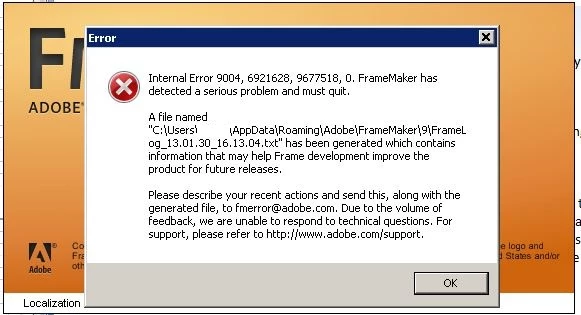
The workaround is to rename the Linguistics folder to something else relaunch FrameMaker 9 which will create a new Linguistics folder. However, the issue returns almost every month and we are not sure why. Any advice on how to prevent the Linguistics folder from being corrupted?

One thing to note is that the user has FrameMaker 7.2 and FrameMaker 10 installed concurrently. She often has FM 9 and FM 10 open at the same time.

Here is the *.txt file that the error message is referring to:

  === Header Begin ===

Internal Error: 9004, 6921628, 9677518, 0

FrameMaker 9.0.0 for Intel

Build: 9.0p255

Window System: MSWindows

Operating System: Windows NT 6.1 (major.minor.build: 6.1.7601 Service Pack 1)

Generated on: Wednesday, January 30, 2013 4:13:04 PM

To file: C:\Users\username\AppData\Roaming\Adobe\FrameMaker\9\FrameLog_13.01.30_16.13.04.txt

=== Header End ===

[Spurious content deleted by moderator]

    This topic has been closed for replies.

    1 reply

    Arnis Gubins
    Inspiring
    January 31, 2013

    If it's the Linguistics issue that keeps recurring, then it's possible that there may be hardware issues on that platform, i.e. disk write caching isn't working properly - getting flushed before operations complete, or bad tracks/sectors on the disk or some other gremlins.

    Having multiple versions installed concurrently isn't an issue for FM (I have all versions going back to 6.0 on one machine). However, I'm kind of wondering if concurrently running more recent versions, like FM9 & FM10, might also be contributory factor. AFAIK, there's only one Linguistics folder for each user that gets setup, so if both apps are vying for the same files, there may be collisions and possibly corruptions taking place. Any specific reason why both versions need to be open at the same time?

    Participant
    January 31, 2013

    Thanks for the info Arnis. I think for now I'll inform the user to try using only one FrameMaker software at a single time to see if it helps. As far as I know, the reason why she uses both currently because of compatibility issues between the two versions and working in both version concurrently would be more efficient.