
Inspiring
January 9, 2017
Answered

Framemaker 9: Variables and other issues messing up my PDF TOC links

  • January 9, 2017
  • 3 replies
  • 949 views

Hello all,

I use variables in my user guide, so that application and feature names are consistent and easy to change when product owners change them.

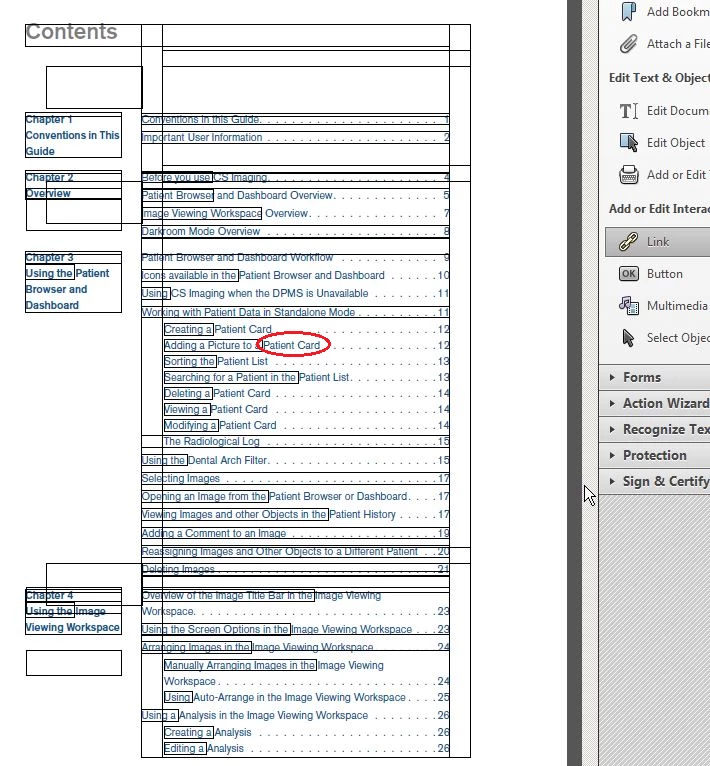
When I generate a PDF, the resulting TOC shows that the correct link does not include the variable text. So I have to each time manually stretch the link to cover the entire line. (see red circle below... "Patient Card" is a variable in the title)

Also, I'm getting all sorts of crap link boxes all over the first page of the TOC that lead to the same set link to some document that I don't use. (see all the boxes of varying sizes that all have to be manually deleted to uncover the correct links).
I had to reuse the settings from another document's TOC file, and so I inherited something from it that I can't find either in the master or reference page.

Any feedback or leads to topics about this would be appreciated.
Regards,

Charlotte

This topic has been closed for replies.
Correct answer Winfried Reng

Do your variable definitions have any character formatting?

Or does the character format change in your paragraphs?

A hyperlink does not continue across formatting changes.

3 replies

Winfried RengCommunity ExpertCorrect answer
Community Expert
January 9, 2017

Do your variable definitions have any character formatting?

Or does the character format change in your paragraphs?

A hyperlink does not continue across formatting changes.

Inspiring
January 9, 2017

I do have bold formatting applied to the variables. There's no way to force this?

Barb Binder
Community Expert
Community Expert
January 9, 2017

I do have bold formatting applied to the variables. There's no way to force this?

The link hotspot is assigned to an entire paragraph unless there is a character tag. And no that can't be changed, other than what you are already doing in Acrobat.

From Adobe FrameMaker (2015 release)​ (but true for all versions as far back as I can remember):

Define an active area for a paragraph

Ensure that the same character format is applied to the entire paragraph.

Define separate active areas for adjacent words or phrases

You can assign different hypertext commands to adjacent words or phrases in a paragraph by applying by different or the same character format to the words or phrases. However, you need to ensure that the character formats of the words or phrases are not the same as that of the surrounding paragraph text.

~Barb at Rocky Mountain Training
Jeff_Coatsworth
Community Expert
Community Expert
January 9, 2017

I'd go back to the FM TOC and have a close look at what's appearing there before turning it into a PDF.

Barb Binder
Community Expert
Community Expert
January 9, 2017

Hi Charlotte:

When I generate a PDF, the resulting TOC shows that the correct link does not include the variable text.

For what it's worth, I'm not seeing that behavior in Fm 2015. The word "Color", outlined in the orange boxes is a variable, and the link boxes extend across the entire line, as they are supposed to.

I've never see the extra empty link boxes that I see in your screen shot. You might consider recreating the TOC:

  • Move the old TOC to a different folder.
  • Create a new TOC from scratch.
  • Use File > Import > Formats to import the formatting back into the new unformatted TOC to see if that takes care of the issue.
~Barb at Rocky Mountain Training
Inspiring
January 9, 2017

Hi,

I only have Framemaker 9, and no access to a newer version. Perhaps this problem exists only in 9?

I've looked over the FM 9 TOC in the body, master and reference pages, and can't figure out what's wrong. That's why I finally posted here.

I could just regenerate a fresh TOC, but I'd lose the template formatting too. I didn't create the template; it's been handed down for years, which means it has all sorts of bugs that are pre-existing, and I don't know how to get rid of them. So if anyone has encountered such issues, please advise me.

Regards,

Charlotte

Barb Binder
Community Expert
Community Expert
January 9, 2017

Unfortunately, I can't test this on v9—I don't have it installed anymore. If you can't upgrade, I think you have already figured out how to fix the final version of the TOC links in Acrobat, which is good.

As for losing the formatting, you can re-import all of it to the new file via File > Import > Formats. But note that I said to move the current TOC to a new folder, that way, if you run into trouble, you can just move it back.

~Barb at Rocky Mountain Training