


Known Participant
Nov 3, 2020 2:56 PM UTC
Question

Framemaker cant write the file F:/ or C:/
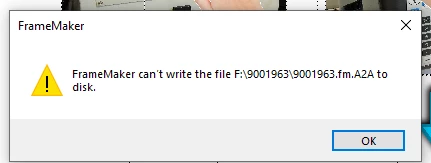
I am still getting this error in framemaker, the only fix is to close the file and reopen and re-save . so far it seems to only be this file but i will know soon when i begin saving other files. Anyone have any other ideas? it happens when saving to C:/ or F:/ Drive

This topic is closed to new replies. Start a new post to keep the conversation going.

37 replies

beau5CC8Author
Known Participant
Nov 3, 2020 4:12 PM UTC

so far its just that one file, also the ssd drive is brand new, been used for under 1 week. It seemed when i get renaming the file i was still geting problems but i will try this again. I switched off that file onto a different project for now. i will update this case with more details soon

Translate
Jeff_Coatsworth
Community Expert
Community Expert
Nov 3, 2020 3:44 PM UTC

I would try creating a brand new file, enter some lorsum ipsum placeholder text, maybe an image or 2, and then save it to F:\ - see how it behaves. There may be something flaky with the SSD or your problem project file. A fresh file behaving fine might indicate an issue with the real file - in which case, a MIF-wash may be advised.

Translate
beau5CC8Author
Known Participant
Nov 3, 2020 3:15 PM UTC


I have full admin rights, i am currently saving to documents circled above, i was saving to F drive. One thing i forgot was i was using a different emploees samsung ssd drive, i transfered this file to the documents folder. then resaved it on my samsung ssd drive. I wonder if this caused some conflict with the file. i attached some screenshots above, what are your thoughts on this desktop for performance for using framemaker.

This is my tower pc, its connected to a network but im not saving the files to a network .

F:/ Is a samsung portable T5 1tb SSD

C:/ -Documents folder on the pc its self

Thanks,

Translate
Bob_Niland
Community Expert
Community Expert
Nov 3, 2020 3:05 PM UTC

What version of FM (and point release)?
What Windows version?
What are you doing when that happens (it looks like the sort of temp file created for Publish).
C:\ is surprising. Is this a local physical PC, or a virtual machine on a server somewhere?

Then we get to: what and where is F:\ ?

I've been running FM on PC with multiple "drives" since FM3, and never had a problem. My current machine has C:\, J:\ and K:\ drives, on two different local SSDs, and there are no issues with .fm files on any of them.

Translate
Jeff_Coatsworth
Community Expert
Community Expert
Nov 3, 2020 3:04 PM UTC

Are you runninig FM with full admin rights? Do you have full admin rights to the external SSD drive?

Translate