rachelt93123223
Known Participant
February 10, 2017
Answered

FrameMaker Chapter Alignment Issue

  • February 10, 2017
  • 1 reply
  • 291 views

One chapter in my FrameMaker document is aligned to the middle-left of the page. We cannot get the chapter to move the paragraphs included to the left of the page. There is a line in the middle-left where the paragraphs begin, but I cannot click on it or move it. How can I realign the chapter to the left of the page?

This topic has been closed for replies.
Correct answer Barb Binder

One chapter in my FrameMaker document is aligned to the middle-left of the page.

Do you mean one chapter title?

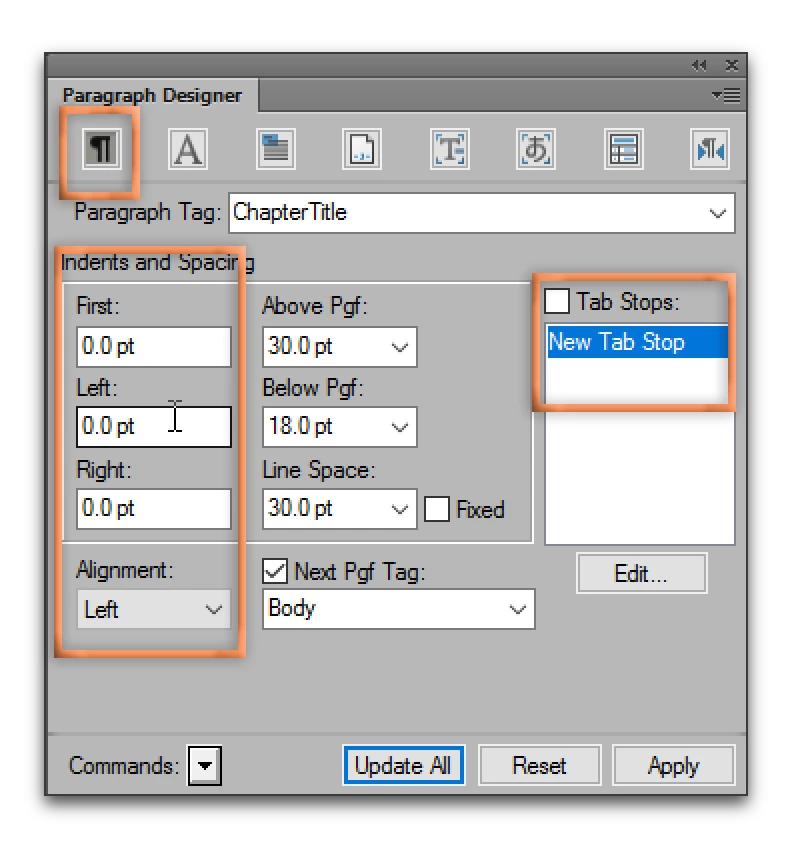
A screen shot would make this easy to figure out, but in the meantime, start with the usual suspects. In Basic properties, look for unintended indents or tab stops:

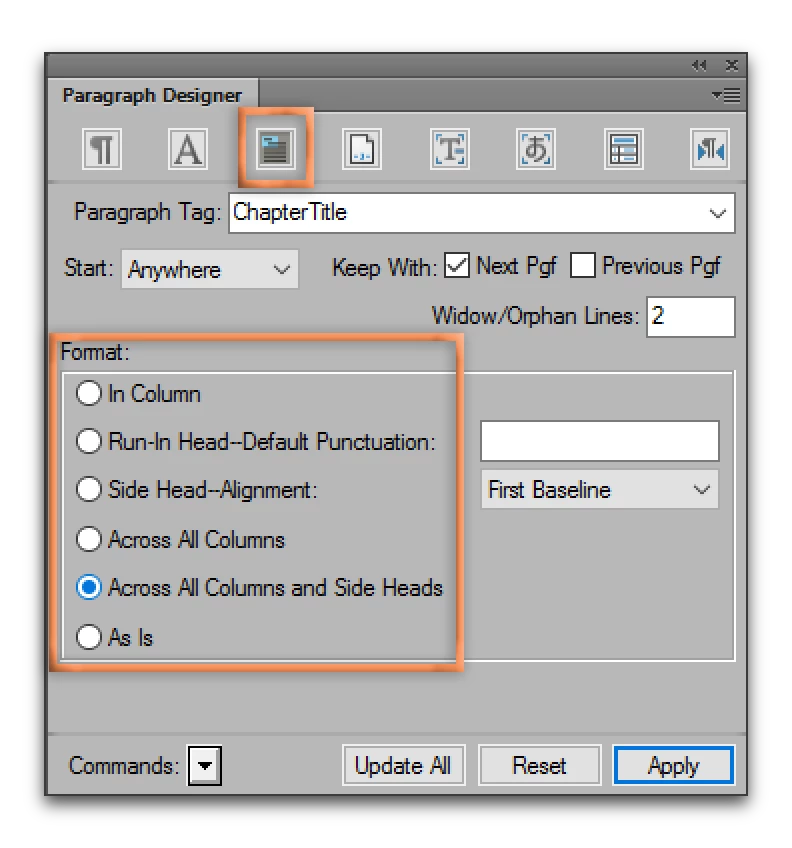
If in a multi-column document, check the Format. It sounds like you might have a 2-column layout but the paragraph isn't set to Across All Columns or Across All Columns and Sideheads, but without more detail, that's just a guess.

Use the button outlined in orange to share a screen shot with your cursor in the paragraph, and View > Text Symbols and View > Borders enabled.

1 reply

Barb Binder
Community Expert
Barb BinderCommunity ExpertCorrect answer
Community Expert
February 10, 2017

One chapter in my FrameMaker document is aligned to the middle-left of the page.

Do you mean one chapter title?

A screen shot would make this easy to figure out, but in the meantime, start with the usual suspects. In Basic properties, look for unintended indents or tab stops:

If in a multi-column document, check the Format. It sounds like you might have a 2-column layout but the paragraph isn't set to Across All Columns or Across All Columns and Sideheads, but without more detail, that's just a guess.

Use the button outlined in orange to share a screen shot with your cursor in the paragraph, and View > Text Symbols and View > Borders enabled.

~Barb at Rocky Mountain Training
rachelt93123223
Known Participant
February 10, 2017

It was the titles and the paragraphs but changing it to Across All Columns and Side Heads worked! Thank you!

Barb Binder
Community Expert
Community Expert
February 10, 2017

Well, that was easy!

Happy Friday.

~Barb at Rocky Mountain Training