
michaelm72532885
Participant
May 19, 2025
Answered

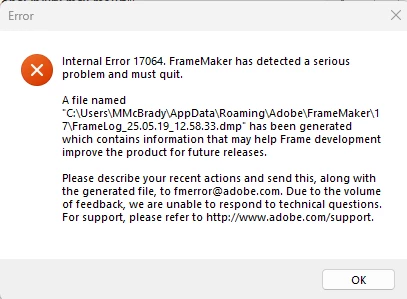
FrameMaker error message.

  • May 19, 2025
  • 4 replies
  • 660 views

I get this error message message when FrameMaker (structured)  crashes (wihich is 5 to 6 times a day!).  Does anyone know what's causing this? 
 

 FrameMaker Version 17.0.6.798


Processor 13th Gen Intel(R) Core(TM) i7-13850HX 2.10 GHz
Installed RAM 32.0 GB (31.8 GB usable)
Device ID 9C6B79F0-289A-4A6F-8935-F865C4EEC5E1
Product ID 00355-62073-68731-AAOEM
System type 64-bit operating system, x64-based processor
Pen and touch No pen or touch input is available for this display

Edition Windows 11 Pro
Version 24H2
Installed on ‎4/‎24/‎2025
OS build 26100.4061
Experience Windows Feature Experience Pack 1000.26100.84.0

Correct answer Matt-Tech Comm Tools

You may have an issue with FrameMaker, or you may have an issue with a corrupt doc.

To quickly check if you have a FrameMaker preferences issue, see this video

https://www.youtube.com/watch?v=yrr3iaXM778

To check if your doc is corrupt, try copying all your content into a new doc, or use the File > Import > File option to bring your content into a fresh FrameMaker document.


4 replies

Matt-Tech Comm Tools
Community Expert
Community Expert
May 21, 2025

Also, are you saving as .fm or some other format like dita XML or sgml?

if so, the issue could be with one or more template files applied when you open the doc.


-Matt Sullivan, FrameMaker Course Creator, Author, Trainer, Consultant
QuintinSeegers
Legend
May 21, 2025

We used to get that alot with one of our documents - turned out the FM file was corrupt. We fixed it by copying (copy/paste, not File > Import) the content to a new document and haven't had the issue with that particular file since.

Matt-Tech Comm Tools
Community Expert
Matt-Tech Comm ToolsCommunity ExpertCorrect answer
Community Expert
May 20, 2025

You may have an issue with FrameMaker, or you may have an issue with a corrupt doc.

To quickly check if you have a FrameMaker preferences issue, see this video

https://www.youtube.com/watch?v=yrr3iaXM778

To check if your doc is corrupt, try copying all your content into a new doc, or use the File > Import > File option to bring your content into a fresh FrameMaker document.


-Matt Sullivan, FrameMaker Course Creator, Author, Trainer, Consultant
Jeff_Coatsworth
Community Expert
Community Expert
May 21, 2025

Doesn't MIF-washing help clean up corrupt FM docs? 

Matt-Tech Comm Tools
Community Expert
Community Expert
May 21, 2025

It can, and certainly doesn't hurt to try.


-Matt Sullivan, FrameMaker Course Creator, Author, Trainer, Consultant
Community Expert
May 20, 2025

Hi,

OK. I see that you use FrameMaker 17.0.6.

We here are only regular FrameMaker users. We cannot interpret the FM dmp file or specific info in these error messages.

Can you describe what you do, when FrameMaker crashes? 5 to 6 times a day is definitely too often.

Did you send the dmp file to fmerror@adobe.com?

I would also contact the FM support. See here:

https://helpx.adobe.com/contact/enterprise-support.other.html#framemaker

tcssup@adobe.com is a team for the Technical Communication Suite products including FrameMaker.

Best regards, Winfried