Participant
March 4, 2024
Answered

Framemaker files keep locking when trying to create a TOC

  • March 4, 2024
  • 2 replies
  • 295 views

I created a book in FM and am now trying to create a TOC. Everytime I do this, I get a Book Error Report stating seveal files are open. I open those files (they were indeed closed), unlock them, save, then close them.  I try to run the TOC again and this time different chapters are locked. This goes on a repeat cycle.  Now, the files I have literally opned and closed 8-10 times are showing as locked... and they are definetely NOT open. I am unable to create the TOC... and making my deadline almost impossible.  Is there a way to get this feature turned off?  Granted, it is helpful so two people are not in the doc at the same time but this unexplained (and unsolveable) locking is driving me insane. I would rather take my chances without this feature. 


I would really appreciate any suggestions!! 

I am on FM Version 17.0.3.546

    This topic has been closed for replies.
    Correct answer frameexpert

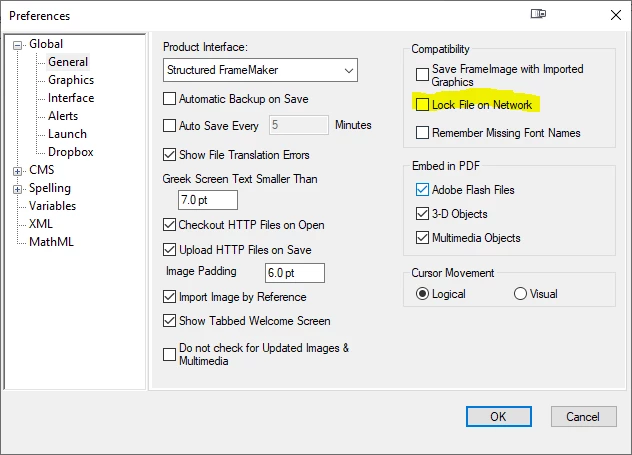
    Choose Edit > Preferences and uncheck this checkbox:

    2 replies

    Community Expert
    March 4, 2024

    Hi Robin,

    Although FrameMaker will now not create any lock files, FrameMaker should not create lock files and not delete them, when a file is closed.

    I have your issue occasionally. What is your FrameMaker version (see in the Help menu)? Do you have the latest update of your version?

    What you can also do: Open all files of the book (when you press Shift while you open the File menu you get a menu item to open all files of the book together). Then you can safely update your book. FrameMaker will not complain about files which are closed, but have a lock file.

    Best regards, Winfried

    frameexpert
    Community Expert
    frameexpertCommunity ExpertCorrect answer
    Community Expert
    March 4, 2024

    Choose Edit > Preferences and uncheck this checkbox:

    RobinNOLAAuthor
    Participant
    March 4, 2024

    THANK YOU!!!! I was about to lose my mind!  I don't know why it keeps locking different files. Really, thank you!!!