
Legend
August 11, 2020
Answered

FrameMaker for DITA … not an encouraging start

  • August 11, 2020
  • 1 reply
  • 517 views

After decades as a happy and committed FM user, and slightly longer (though not continuously) working with structured content, I keep thinking "really ought to have another go at using FM for DITA". Triumph of hope over experience? Here's this afternoon's brick wall: File > New > Dita > map gives me a new map where I can't even work out how to set the title =8-/ click? double-click? right-click? none of the above …
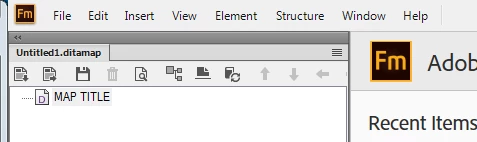
It's bad form, of course, to draw direct comparisons … but in my day-to-day DITA environment, File > New  > Map and the cursor is ready for me to start typing the title.

So, what am I missing? give me some hints on how to set the title for my new map, and then I can go wild trying to insert a couple of children.

This topic has been closed for replies.
Correct answer Amitojsingh

Please click on the 5th icon (Document View) to start working with tile and other metadata as required.


Thanks

Amitoj Singh


1 reply

AmitojsinghCorrect answer
Adobe Employee
August 11, 2020

Please click on the 5th icon (Document View) to start working with tile and other metadata as required.


Thanks

Amitoj Singh


Legend
August 12, 2020

Aha! that does the trick … and after a bit more exploration (since it isn't the fifth icon any more to get back) I discover the menu options View > Document view and View > Switch to tree view. The syntax of the two commands doesn't match, nor do the shortcuts Esc, d, v and Esc, r, m – but I'm pleased to have located the functionality. Thanks.