
QuintinSeegers
Legend
October 4, 2022
Question

FrameMaker goes into Not Responding state when using Save as PDF - (FM2022)

  • October 4, 2022
  • 4 replies
  • 1311 views

Having installed FrameMaker 2022, I'm doing some benchmark testing before rolling it out to the rest of our content creators. We stuck with FrameMaker 2019 because of two issues we were having in FrameMaker2020:

  • Opening/saving/closing documents over VPN is substancially slower - sometimes up to 6x slower. Unfortunately, copying the files to a local drive it not an option for us.
  • Graphics heavy documents are slow to work with. FrameMaker2020 seems to only load/render the graphics for the visible page. Each time a page becomes active, you have to wait 10-20 seconds for the graphics to render/load. Painful when you're trying to scroll past several pages. FrameMaker2019 either loaded/rendered the graphics for all pages when the document was loaded, or it loaded/rendered the graphics for the visible page substantically faster. 

We're still having the above bugbears in FrameMaker2022.


However, we've run into a new issue. I'm not a fan of the Publish option because it doesn't save the PDF file in the selected location, but creates a sub-folder within the selected location to save the PDF file to - requiring the PDF file to be manually moved back to the selected location and deleting the sub-folder. Instad, we use the Save as PDF option.


When using the Save as PDF option in FrameMaker2022, the pdf document is created successfully. However, the Save as PDF window goes into a state of Not Responding and never closes.
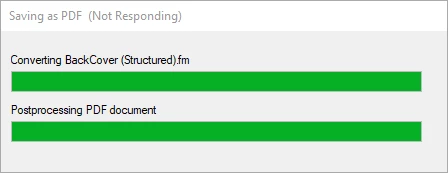
 

In one test it hung around for over 30 minutes before I decided to End Task FrameMaker - which creates a whole lot of other issues with locked files. Saving to a local or network drive gives the same results.


I'm interested to know if any other early adopters are having similar issues?


Thanks,

Quintin

    This topic has been closed for replies.

    4 replies

    Participating Frequently
    October 11, 2024

    I had this issue, just go to publish option and create the pdf. You will not face any error.

    QuintinSeegers
    Legend
    October 13, 2024

    The Publish option solves the issue, but it saves the PDF file in unwanted subfolders, so not a practical solution for us.

    Community Expert
    October 14, 2024

    Hi,

    Save as PDF is the same as when you create the PDF via the Publish menu.

    Save as PDF saves in the same folder as the FrameMaker file.

    Best regards, Winfried

    Participant
    October 11, 2024

    I experience this same issue when I have Adobe Acrobat open.  When I close Adobe Acrobat, and save as PDF, it processes correctly.  I also deleted all other PDF printers as well.

    Matt-Tech Comm Tools
    Community Expert
    Community Expert
    October 4, 2022

    Sounds like saving an STS for the project (with a custom output location) and using Publish would be faster than dealing with the nonresponsive progress bar.

    -Matt Sullivan, FrameMaker Course Creator, Author, Trainer, Consultant
    QuintinSeegers
    Legend
    October 4, 2022

    @Matt-Tech Comm Tools Are you refering to the Output Folder in the Publish Pod:

    Except FrameMaker will create a subfolder within the specified Output Folder and save the output to that subfolder instead. So, unless Adobe adds an option to turn off the 'create a subfolder within the selected Output Folder' behaviour, I'm not touching the Publish option with a 10-foot barge pole.


    The only workaround I found so far was to use the Print Book option, printing to the Adobe PDF printer. Several versions ago (I think it might have been FrameMaker 7) we had a similar issue with the Save as PDF option and had to use the Print Book option instead. Only downside is that PNGs with transparent backgrounds don't print correctly, so had to replace them with EPS versions of the images.

    Dave Creamer of IDEAS
    Community Expert
    Community Expert
    October 4, 2022

    I've received errors with the Save as PDF menu/method. The Publish method always seems to work even if I have the slight inconvenience of moving the PDF when it's finished. 


    David Creamer: Community Expert (ACI and ACE 1995-2023)
    LinSims
    Community Expert
    Community Expert
    October 4, 2022

    I haven't run into either issue, and all my documents (and graphics) are sitting out in cloud storage.


    And I'm with you on the Publish option. I want the document where I want it, not someplace else that Adobe thinks is a better idea. I had more than my fill of that s**t with Microsoft.

    QuintinSeegers
    Legend
    October 4, 2022
    quote

    And I'm with you on the Publish option. I want the document where I want it, not someplace else that Adobe thinks is a better idea. I had more than my fill of that s**t with Microsoft.


    By @LinSims

    Couldn't agree more with this statement!