Participant
September 3, 2024
Answered

Framemaker image location in PDF output file moves, V16 to V17

  • September 3, 2024
  • 4 replies
  • 894 views

I recently upgraded from V16 to V17. When I've converted my V16 *.fm files to the new version, images that were properly centered on the ouput PDF file pages using "File/Save as PDF..." are now often shifted up and partially off the page using the same command in V17.


If I use "File/Print" and direct the output to Adobe PDF the images are correctly located.


So far, I'd call this an inconvenience and not a game stopper.


But, when I publish the entire book, all images exhibit the location shift up and partially off the page.


Any suggestions?

This topic has been closed for replies.
Correct answer FrameMaker-dk

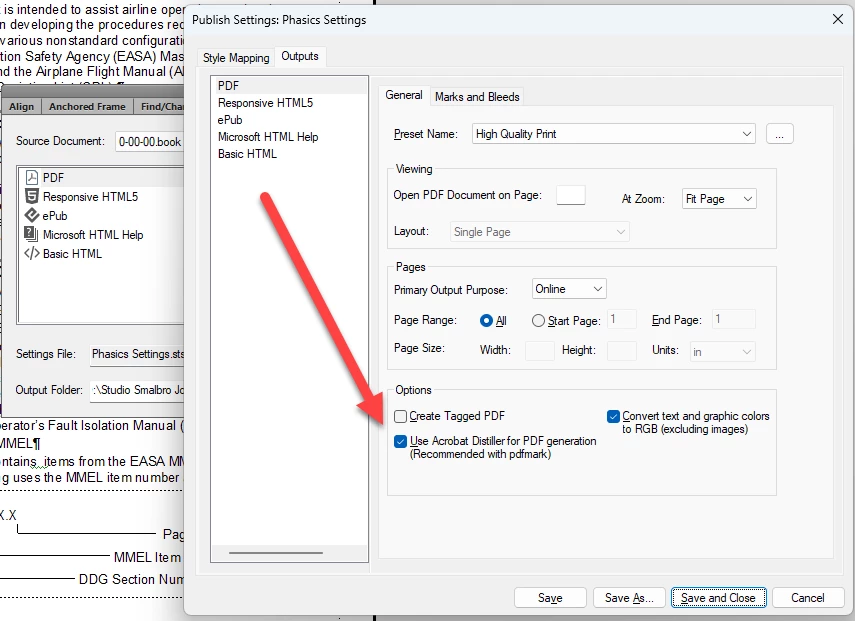
That DOES look odd. Make sure you are using Acrobat Distiller when creating pdf's. In the Publish dialogue.

I don't know  whether this will resolve the issues, but it is usually the best way to force FrameMaker to print properly.

4 replies

Jeff_Coatsworth
Community Expert
Community Expert
September 5, 2024

@Edward25861905r4ia - you don't mention the exact point version of FM2022 you're running - check that to see that you're completely up to date and if it still occurs, then report the effect as a bug to the FM folks (tcssup@adobe.com)

Community Expert
September 5, 2024

You can report the bug also in the Adobe Tracker:

https://tracker.adobe.com/

Jeff_Coatsworth
Community Expert
Community Expert
September 5, 2024

Sorry, I should have put that in too - I have a macro set up for it & forgot to use it.

Community Expert
September 4, 2024

... another option - use the Microsoft PDF printer driver. There are other PDF utilities beside Adobes and some of them are really good. I often use the Microsoft option if I get tired of Acrobats many oddities. 

Bjørn Smalbro - FrameMaker.dk
Jeff_Coatsworth
Community Expert
Community Expert
September 4, 2024

Newest version of FM uses the same route for Save As PDF and Publish to PDF - both use the new PDF creation engine. Print to Adobe PDF printer instance still uses the older model. You can force the use of the older one through the field that @FrameMaker-dk talks about in the Publish settings.

FrameMaker-dkCommunity ExpertCorrect answer
Community Expert
September 3, 2024

That DOES look odd. Make sure you are using Acrobat Distiller when creating pdf's. In the Publish dialogue.

I don't know  whether this will resolve the issues, but it is usually the best way to force FrameMaker to print properly.

Bjørn Smalbro - FrameMaker.dk
Participant
September 4, 2024

I specified the Adobe Distiller and that seems to have resolved the problem. Thanks!

frameexpert
Community Expert
Community Expert
September 4, 2024

I would still consider this a severe bug and report it as such. The Distiller route is much slower than the new PDF Engine, introduced in 2019.