

Les Harris
Inspiring
September 29, 2025
Question

FrameMaker indexing using a conditional tag

  • September 29, 2025
  • 2 replies
  • 185 views

I am updating a FrameMaker book in which a previous author used an indexing technique I haven't encountered before.

There are conventional markers of type "Index", but these are replicated as text with a conditional tag called "Index" applied to it. The markers use this syntax: 

.i.[topic]:[sub-topic];
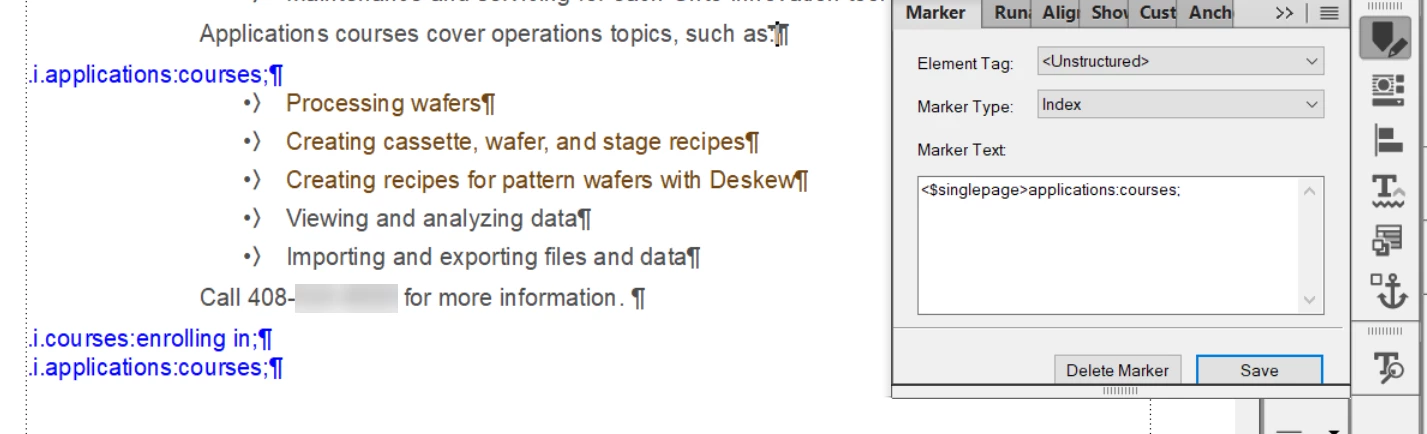
How do you turn these conditional text markers into an index, and why might an author use this approach?

Thanks in advance for any insights!  

2 replies

frameexpert
Community Expert
Community Expert
September 29, 2025

He may be using a third-party indexing tool that converts the markers into conditional text and vise versa. IXGen was a FrameMaker plugin that did this kind of thing. There was another one too. You should check Scott Prentice's FrameMaker Tools page: 

https://leximation.com/tools/

There is one listed called MarkerTools that may be the one used on your documents.

Les Harris
Inspiring
September 30, 2025

Thanks Rick. I am running Frame 17.0.6. MarkerTools won't install. I didn't try to install IXGen because other community members have said that it doesn't work with Frame 2019 or later. Which is unfortunate because from looking at the documentation it was pretty slick.

frameexpert
Community Expert
Community Expert
September 30, 2025

Yes, a lot of the older stuff won't work with later versions. I could provide you with an ExtendScript script that would convert these conditional text entries into markers (and back if you want). If you are interested, please send me a sample document offlist and I will give you a quote. Thanks.

Jeff_Coatsworth
Community Expert
Community Expert
September 29, 2025

I don't see the condition tag you talk about in the Marker Text - are you referring to the text in blue - e.g. .i.applications:courses;

Les Harris
Inspiring
September 29, 2025

Yes.