
Inspiring
July 26, 2021
Answered

FrameMaker PDF links working from one PDF to another, but one file closes

  • July 26, 2021
  • 1 reply
  • 319 views

I have finally created two PDFs where one has links the open topics in another.  However, when clicking the link in PDF A, it does hyperlink to the topic in PDF B, but PDF A then closes.
    This topic has been closed for replies.
    Correct answer frameexpert

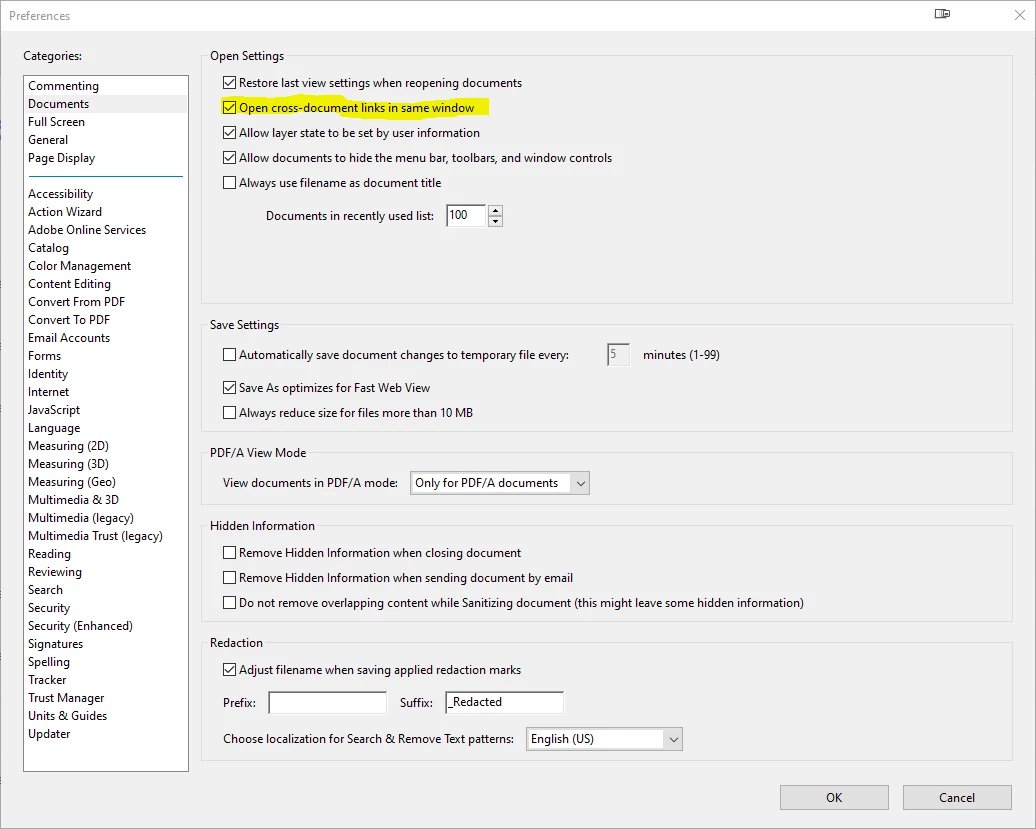
    This is usually an Acrobat viewer setting; for example, here is the setting in Acrobat Pro. You can't control these settings from FrameMaker.


    1 reply

    frameexpert
    Community Expert
    frameexpertCommunity ExpertCorrect answer
    Community Expert
    July 26, 2021

    This is usually an Acrobat viewer setting; for example, here is the setting in Acrobat Pro. You can't control these settings from FrameMaker.


    Inspiring
    July 27, 2021

    Thanks Rick!  I resolved this one.  In addition to the checkbox displayed in your screenshot, I also had to change the execution of each individual link to "New Window." I guess the only question yet to resolve is how to maintain the relative paths so that SharePoint stores the relative path and maintains the PDF linking.  I have found that our company is using Sharepoint as the repository to publish all files to the internal network.  I think this last one is going to be a question for the folks setting up Sharepoint and delivery of these PDFs to the network.  It's probably an Adobe question.


    I did get everything else working well, so thanks for your patience, assistance, and expertise.  You have been a great help!


    Ken