
FrameMaker publish to WebHelp: TOC is appearing as all one level
I am using FrameMaker 2015. I tried the File > Publish feature, and selected WebHelp as the output.
Everything seems to be working as expected, except for the Contents tab in the WebHelp output. Instead of the hierarchy of books and pages according to the heading levels, I have a flat list of topics all using the page icon, like this:
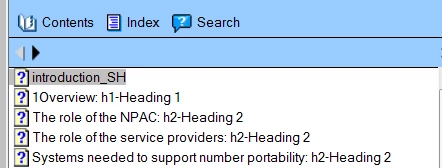
(Ignore the heading information in the titles - I added that to help track what was going on.)
I've hunted around for any TOC settings with no luck.
I tried to find which file I could manually edit to change the layout and had no luck with that either.
(I am familiar with this feature in RoboHelp. In FrameMaker, there is no feature to edit the TOC.)
How are the heading levels created in the TOC, and how do I change it?
Thanks,
Debbie


 AdChoices