
Participant
January 4, 2022
Answered

Framemaker shifts letters

  • January 4, 2022
  • 1 reply
  • 574 views

Hello and a happy new Year,

I am quite new to Adobe Framemaker. I noticed, that some letters are shifted after creating the PDF. (see attachment). Even swichting the font from Myriad Pro to Calibri does not help, it makes it even worse. Has anybody an idea? I searched the internet but could not find any helpful tips. The console prints: 

German:

"Schrift MS 明朝 ist nicht verfügbar.
MS Mincho wird in dieser Sitzung verwendet."

Englisch:

"Font MS 明朝 not found.
MS Mincho will be used in this session".

Is this the reason? But why does is happen with Calibri, too? How can I fix this?

Thank you very much for your help.

Kind regards,
Sebastian
    This topic has been closed for replies.
    Correct answer pulkitn

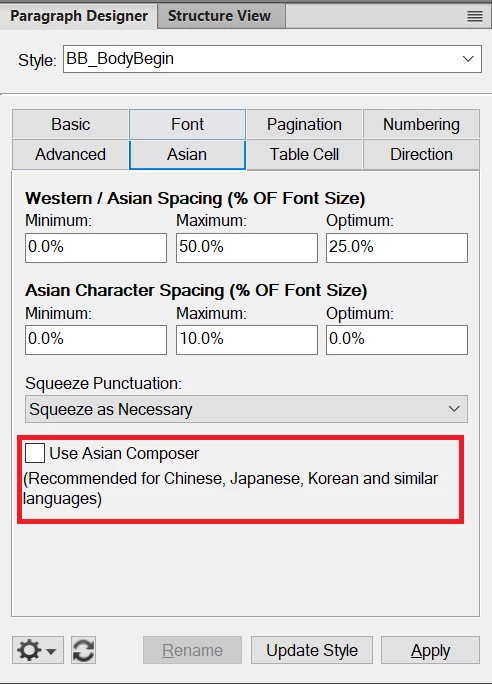
    As far as I understand and my past experience , I think this might be occurring due to one settings in Paragraph Designer ( Ctrl +m)  i.e " Use Asian Composer " under  " Asian " tab .
    If you are using English language then I suggest you you to kindly turn off this checkbox ( as this is intended for CJK and similar languages )  and try to publish PDF again .


    Thanks 
    Pulkit Nagpal


    1 reply

    pulkitn
    Adobe Employee
    pulkitnCorrect answer
    Adobe Employee
    January 4, 2022

    As far as I understand and my past experience , I think this might be occurring due to one settings in Paragraph Designer ( Ctrl +m)  i.e " Use Asian Composer " under  " Asian " tab .
    If you are using English language then I suggest you you to kindly turn off this checkbox ( as this is intended for CJK and similar languages )  and try to publish PDF again .


    Thanks 
    Pulkit Nagpal


    Participant
    January 4, 2022

    Hello,

    thank you very much! This is it. It works like a charm 🙂 


    Kind regards,

    Sebastian