bneeson75
Inspiring
July 23, 2019
Answered

FrameMaker Unstructured Document Help

  • July 23, 2019
  • 2 replies
  • 936 views

I want to swap the position of 2x pages in my unstructured document, but I don't see an easy way to do it - and I don't know all the ins and outs of Framemaker either.

Is it possible to do a live session with someone - where I can show my document and what I am trying to achieve? - preferably with assistance on which menu options to pick, to get the job done.

I am using FM 2015 Version 13.0.2.433

Hope someone can help, as I feel like I'm bashing my head against a brick wall, in trying to find the solution myself.

    This topic has been closed for replies.
    Correct answer bneeson75

    Hi Winifred,

    Thanks for your reply.

    Looking at the screenshot below, from 1x section of my 'Installation Instruction' document - what is now page 1, was page 3 ... I managed to 'move' it by creating a 'disconnected page' before the previous Page 1, which is now 'Page 2' ... then I simply copied and pasted the table into the new page 1 and when satisfied that it all looked right, I deleted it from its original page and then deleted the extra pages that were generated as a result of doing this action.
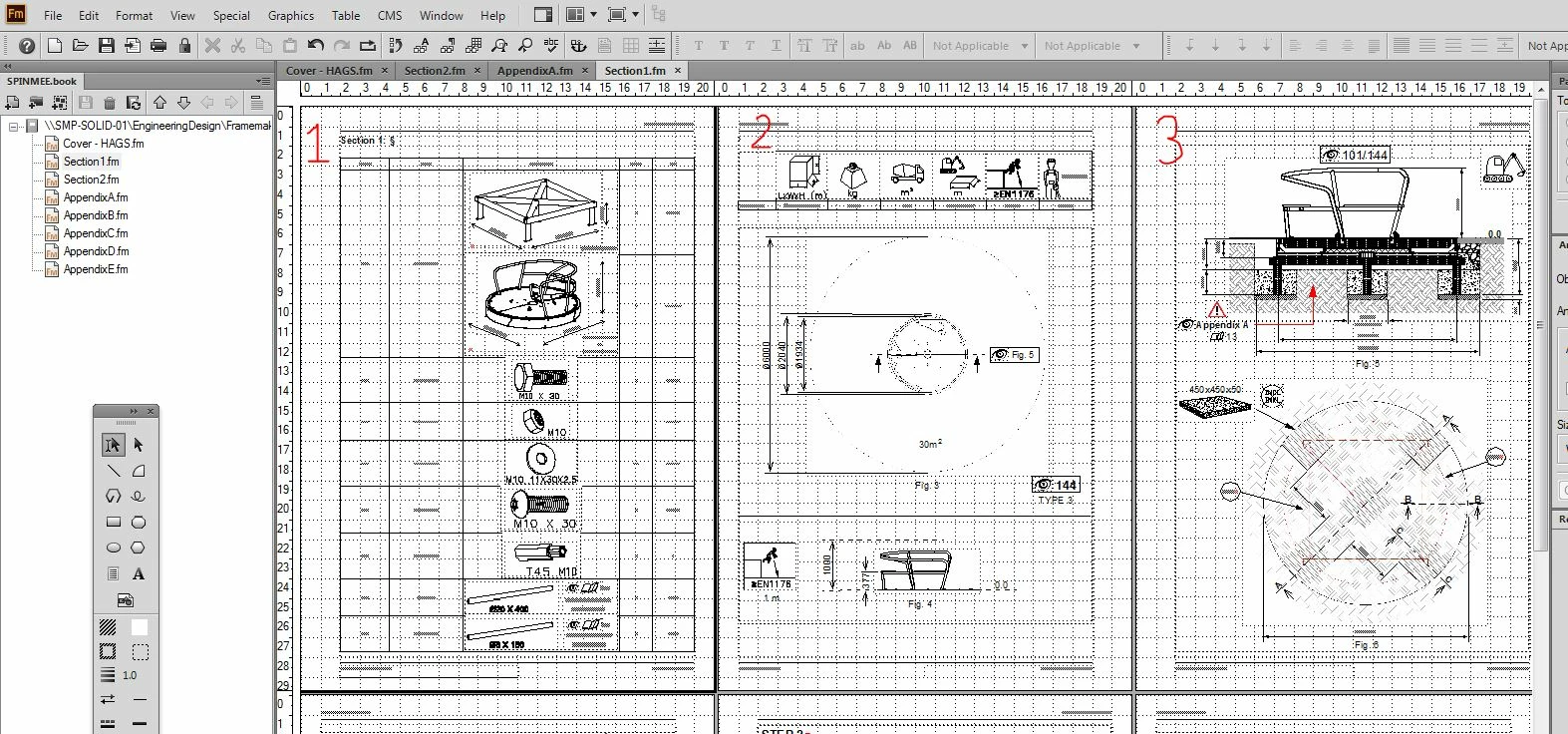
    However, I just found this 'workaround' by chance, after tearing my hair out for a while and not finding anything useful in Help.

    Its quite frustrating that you can't drag pages around to change their order like in InDesign (we use both programs here, but I have to maintain the use of Framemaker for updating legacy documents - which this one that I am working on is).

    From all of the help topics or tutorials I have seen regarding unstructured documents, I have not yet seen anything that indicates how to do stuff like this - to change the document layout as you are working on it.

    Any pointers you can give in terms of making this easier, would be greatly appreciated. I have been using FrameMaker on and off for 6.5 years, but I've never had any formal training on it & I find it very frustrating to work with, on the rare occassions that I have to use it.

    Thanks & regards,

    Brian.

    2 replies

    LinSims
    Community Expert
    Community Expert
    July 23, 2019

    Brian:

    Matt Sullivan of Tech Comm Tools has a free (sponsored by Adobe) introductory tutorial to Frame 19, which is a good place to start. He and others also have courses that will teach you the ins and outs of FrameMaker. Barb Binder is good, as is Shlomo Peretz of Microtype (I took his Templates course a number of years ago, and it was amazing).

    Community Expert
    July 23, 2019

    Hi,

    Are these pages separate files in a book?

    If yes, just click on a file with your mouse, hold the mouse button pressed, and then move the file to the location which you want.

    If the content is in a single file, then just cut the content which you want to move (CTRL+X), put the insertion mark where you want the text to be and insert the text there (CTRL+V).

    No. I cannot do a live session for you. I am also just a regular user, not an Adobe employee.

    Can you make a screenshot and mark how it should look like?

    Upload the screenshot with one of the small buttons in this forum editor.

    Additionally I recommend to update to the latest patch. You can download all patches here:

    https://supportdownloads.adobe.com/product.jsp?product=22&platform=Windows

    Note that the patches are not cumulative. This means, you have to install patch 3.1, then 4 and then 5.

    Best regards

    Winfried

    bneeson75
    bneeson75AuthorCorrect answer
    Inspiring
    July 23, 2019

    Hi Winifred,

    Thanks for your reply.

    Looking at the screenshot below, from 1x section of my 'Installation Instruction' document - what is now page 1, was page 3 ... I managed to 'move' it by creating a 'disconnected page' before the previous Page 1, which is now 'Page 2' ... then I simply copied and pasted the table into the new page 1 and when satisfied that it all looked right, I deleted it from its original page and then deleted the extra pages that were generated as a result of doing this action.

    However, I just found this 'workaround' by chance, after tearing my hair out for a while and not finding anything useful in Help.

    Its quite frustrating that you can't drag pages around to change their order like in InDesign (we use both programs here, but I have to maintain the use of Framemaker for updating legacy documents - which this one that I am working on is).

    From all of the help topics or tutorials I have seen regarding unstructured documents, I have not yet seen anything that indicates how to do stuff like this - to change the document layout as you are working on it.

    Any pointers you can give in terms of making this easier, would be greatly appreciated. I have been using FrameMaker on and off for 6.5 years, but I've never had any formal training on it & I find it very frustrating to work with, on the rare occassions that I have to use it.

    Thanks & regards,

    Brian.

    Community Expert
    July 23, 2019

    Hi Brian,

    Yes. FrameMaker does not work like InDesign.The pages are not disconnected separate entities. Instead you have a text flow which starts at the start of the file and ends on the last page. (You can also setup InDesign to have a text flow.)

    Pages are created automatically, when they are needed. You do not have to create additional pages.

    When you want something to fill a page, then you can set the heading to start at the top of page and possibly extend the text frame at the bottom.

    You should set everything in the designers (paragraph, character, table), so that all paragraphs start where you want them to without any intervention.

    In your case you should have just cut the content and inserted it before another section.

    You should not use disconnected pages. After you had done this, you cannot maintain the file properly.

    When you want to work with FrameMaker and have these difficulties, then you should invest some time and effort. Either with a training (in the forum there are some people who offer such trainings, also via webinars; or search for a FrameMaker training in your area). Or buy some books. Or at least study the FrameMaker online help. You can also download the PDF version. Sometimes it's easier to use the PDF.

    FM 2019: https://helpx.adobe.com/framemaker/help/help-resources.html

    FM 2015: https://help.adobe.com/en_US/framemaker/2015/using/framemaker_help.pdf

    Best regards

    Winfried