


Participating Frequently
August 6, 2026
Question

FrameMaker Ver. 16 - Paragraph Designer Pagination issue

  • August 6, 2026
  • 11 replies
  • 37 views

My company is using established templates for service manuals created by someone well before my time and I am trying to resolve an undesirable pagination issue that occurs regardless (seemingly) of the constraints/rules set in the paragraph designer. I have no formal FrameMaker, training so I hope I’m able to provide enough detail for you all.

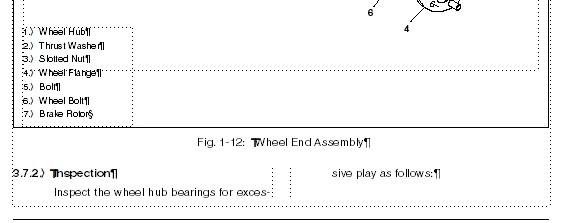
We use a 2-column layout for the text but also allow for full page width image frames and tables. This problem only occurs with text following a page width image or table near the bottom of the page. In this case, I have an image frame with fig number and description

followed by a level 3 heading that is set to Keep With: Next Paragraph. Then the text following the heading has Widow/Orphan Lines set to 2. 
Pagination Issue

Given the rules applied to the heading and text, they should both push to the next page in my mind. Is there some setting I am missing that is preventing that from happening?


Thank you.

    11 replies

    frameexpert
    Community Expert
    Community Expert
    August 6, 2026

    Sometimes when there is a combination of pagination scenarios that can occur in a particular situation, you get odd results like you are getting. You may have to do some tweaking to get the desired result. In this case, I would consider adding a H3_top paragraph format that is exactly like the H3 format, except that it starts at the top of the page. Apply any special paragraph formats like this as late in the editing process as possible. Make sure you include your H3_top format in any TOCs or lists where you have included H3 paragraphs.

    www.frameexpert.com
    jeff_2298Author
    Participating Frequently
    August 6, 2026

    Our service manuals are approx 1500 pages long and we output 2 or 3 per week (build specific), amongst all of our other deliverables that go with them, so I was hoping to avoid having to do this but it’s definitely an option for the short term at minimum. I appreciate the advice.

    frameexpert
    Community Expert
    Community Expert
    August 6, 2026

    Doing page layout of long manuals with some complexity usually requires some “hand work” unless you can live with anomalies like you are seeing. I agree, though, that based on your settings, you should have gotten an automatic page break there.

    www.frameexpert.com
    Jeff_Coatsworth
    Community Expert
    Community Expert
    August 6, 2026

    You might want to have a look at this older thread - 

    for some w/o guidance.

    jeff_2298Author
    Participating Frequently
    August 6, 2026

    I read this, but I’m still not understanding how this would be allowed to happen.

    If I change it to keep with next paragraph, it creates undesirable results in other areas. 

    I apologize if I’m just not understanding. As I said previously, I am a novice user.

    Jeff_Coatsworth
    Community Expert
    Community Expert
    August 6, 2026

    What does it do if you set it to a higher number? (I ask because I don’t set these W/O settings at all in my projects since I’m 99.9% HTML5 output).

    Jeff_Coatsworth
    Community Expert
    Community Expert
    August 6, 2026

    So the “Inspection” paragraph is your H3 one, right? Looks like it’s doing what it’s told - keep with the next paragraph tag - the “Inspect the wheel hub...” one.

    jeff_2298Author
    Participating Frequently
    August 6, 2026

    Correct, the heading is doing what it’s told, but the text (Inspect the wheel hub...) has widow/orphan set to 2, and it’s allowing 1 line in this case. So in my mind the text should be forced to next page, and in turn drag the heading with it?

    Jeff_Coatsworth
    Community Expert
    Community Expert
    August 6, 2026

    Does that text paragraph have a Keep With: Next Pgf set also?