


Participating Frequently
February 27, 2013
Answered

FrameMaker10 - Windows 7 - How to get background color for a paragraph tag?
  • February 27, 2013
  • 1 reply
  • 2445 views

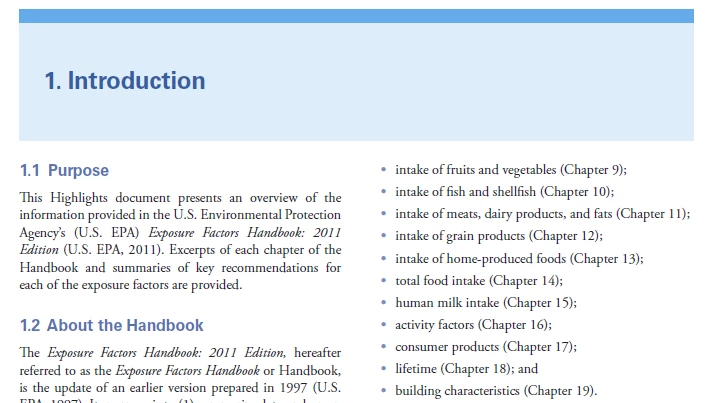
I am trying to create my heading1 with a background like the picture above.

I have put the blue background on a master page, but the body frame goes into the blue background and subsequently the blue background does not show through.

Any ideas?

Thanks,

Cindy

    This topic has been closed for replies.
    Correct answer Arnis Gubins

    Cindy,

    You have to create a specific master page for the chapter opening/first page that contains two connected text frames. The top most frame would have the blue background and be meant for the title. The next text frame would pick up the text and have two columns.

    1 reply

    Arnis Gubins
    Arnis GubinsCorrect answer
    Inspiring
    February 27, 2013

    Cindy,

    You have to create a specific master page for the chapter opening/first page that contains two connected text frames. The top most frame would have the blue background and be meant for the title. The next text frame would pick up the text and have two columns.

    Participating Frequently
    February 27, 2013

    As usual...you rock Arnis!!!

    Arnis Gubins
    Inspiring
    February 28, 2013

    Cindy, I missed the fact that you're title is centred in the block. You could use a single-cell table construct to hold the contents for the title and have the title paratag set to be in the middle of the cell. (you could also colour the cell and skip colouring on the Master page).

    There are always multiple ways to do things in FM, that's why it sometimes seem so hard to use...