


Craig_vst
Participant
March 2, 2016
Question

FrameMaker12 Export page to XML

  • March 2, 2016
  • 2 replies
  • 398 views

So, here is the problem - when attempting to export to XML from a page I randomly receive the following message:
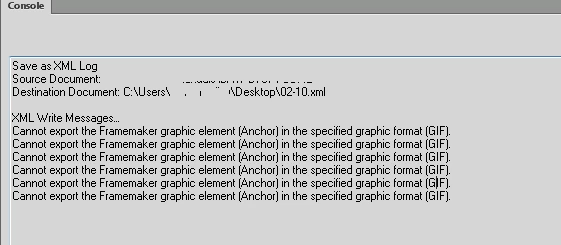
This is completely random and can fix itself after a random period of time.  Inspecting what the application is doing leads me to believe the following files are involved in the export:

0x000000006f730000  0xc000    c:\program files (x86)\adobe\adobeframemaker12\filters\fmexport.dll

0x000000002b430000  0xcb000   c:\program files (x86)\adobe\adobeframemaker12\filters\isgdi32.dll

0x000000000f9a0000  0x22000   c:\program files (x86)\adobe\adobeframemaker12\filters\imfmv2.flt

0x0000000010970000  0x27000   c:\program files (x86)\adobe\adobeframemaker12\filters\ebgif2.flt

The application does not seem to access the files when its in a failure state, has anyone seen this issue before - or alternately know how I can force FrameMaker to output a diagnostic log file?

    This topic has been closed for replies.

    2 replies

    Inspiring
    March 3, 2016

    Craig,

       Are these large documents? Books? Does relaunching FM or rebooting your machine make a difference? And is your copy of FM fully updated?

             --Lynne

    Craig_vst
    Craig_vstAuthor
    Participant
    March 4, 2016

    Hi Lynne, there doesn't seem to be a correlation between the size of the books.  A reboot or relaunching FM does not seem to make an appreciable difference on it working.  Sometimes I can make a coffee and have it work straight away, then sometimes it needs a few hours, the unusual thing is that it can switch between working and not and back again by literally leaving the computer alone.  Very odd!

    Inspiring
    March 4, 2016

    Craig,

       In your situation, I would try the following:

    1. If leaving the computer really seems to make a difference, I would wonder about some interaction between FM and something else you are running. What happens if you power off your machine, power back on, run FM only and try to export one of these books? Eliminate other software tools, one at a time, in your testing.

    2. Create as small a test case as you can that fails. Try a single document instead of a book. Remove as much content as possible to leave a valid document. Try a document with only one graphic. Disable any custom API client. Try simplifying the EDD/DTD by removing any unused elements and attributes.

    3. Try using a different computer. For example, if you can create a small failing document with no proprietary data, I'd be willing to try an export on my machine.

    4. Send the smallest non-proprietary test case you can create to Adobe as the attachment in a bug report.

    Good luck.

           --Lynne

    Inspiring
    March 2, 2016

    Craig,

      When you say this is a random problem, do you mean that some graphics export and others don't, or do you mean that you can export the same graphic successfully sometimes and not others? What is the format of the graphics?

          --Lynne

    Craig_vst
    Craig_vstAuthor
    Participant
    March 3, 2016

    Hi Lynne,

    Sorry, its the latter - the randomness is whether the graphics will export at all, it does seem to be all or nothing.

    In this case the export was intended to export to GIF however changing to a different format does not seem to make any difference (until I walk away and come back at a random period of time it might then work).

    Craig