
Generated TOC has two TOC Reference Pages (TOC and TOC1)
Hi,
I created a new book and added one file called FrontMatter.fm. That file has four Reference Pages (Reference, MasterPageMaps, TOC, and IX). The TOC Reference Page has the formatting (styles, tabs, leaaders, etc.) I would like the generated TOC to use, as shown below:
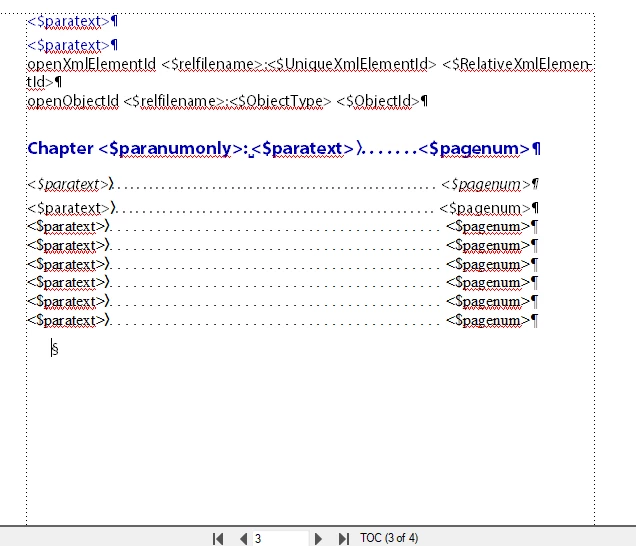
I then use Insert > Create TOC to add a generated TOC to the book. In the Set Up Table Of Contents dialog I add the heading styles I want to use and click OK. In the Update Book dialog I leave the defaults and click Update.
The generated TOC has 5 Reference Pages (Reference, MasterPageMaps, TOC, IX, and TOC1). The TOC Reference Page looks like the image above (as expected), but the TOC1 Reference Page looks like this:
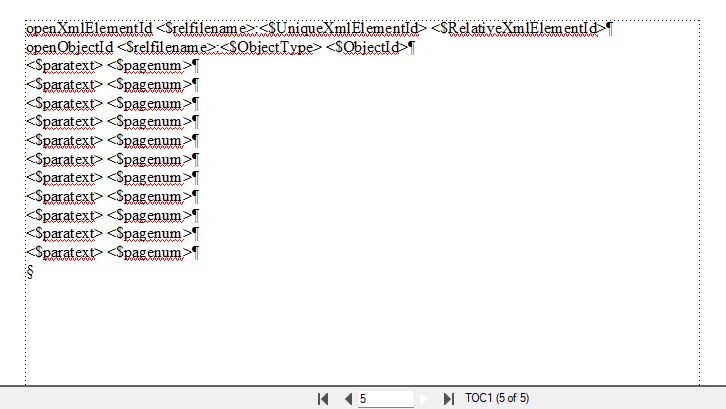
The TOC entries that are created on the Body page of the generated TOC are using the formatting from the TOC1 Reference Page (not the ones from the TOC Reference Page).
At one point it was working correctly, so I figure I must have subsequently made some change to the FrontMatter.fm that is causing this new behavior. I deleted the book and TOC files and started over as described above, and the issue keeps happening. It seems the issue must be in the FrontMatter.fm file but it looks OK as far as I can tell. I'd rather not have to recreate the FrontMatter.fm file if I can avoid it (and in any case I'd like to understand what I may have done to cause the problem so that I don't inadvertently do it again).
So, can you suggest a specific reason why FrameMaker is ignoring the TOC Reference Page (inherited from FrontMatter.fm) and instead is creating and using a new TOC1 Reference Page?
Thanks,
Geoff


 AdChoices