
Known Participant
May 7, 2019
Answered

Getting artboard number from imported by reference AI file

  • May 7, 2019
  • 2 replies
  • 459 views

I need to know if there's a way to get the Artboard number from an "Imported by Reference" Adobe Illustrator file?

By looking at the Object Properties while the imported by Reference AI graphic is selected, I can see the file location and also the Artboard number, as shown below:
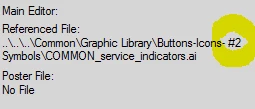
When getting the file location using InsetFile, the artboard number does not show as part of the file location.

Thanks.

This topic has been closed for replies.
Correct answer frameexpert

I tried setting up an Illustrator CS6 file with three artboards. I imported each artboard into a separate anchored frame. Here is how ExtendScript shows the PageNum property for each one:

Artboard 1: -1

Artboard 2: 1

Artboard 3: 2

I am not sure if that pattern holds, but it is a place for you to start.

2 replies

fonrigAuthor
Known Participant
May 14, 2019

Seems like pattern holds. I created 30 artboards and I'm getting 29 for PageNum. I was expecting to be able to read the Artboard name but that might be a stretch.

Thanks!

frameexpert
Community Expert
Community Expert
May 7, 2019

Did you try checking the Inset's PageNum property?

www.frameexpert.com
frameexpert
Community Expert
frameexpertCommunity ExpertCorrect answer
Community Expert
May 7, 2019

I tried setting up an Illustrator CS6 file with three artboards. I imported each artboard into a separate anchored frame. Here is how ExtendScript shows the PageNum property for each one:

Artboard 1: -1

Artboard 2: 1

Artboard 3: 2

I am not sure if that pattern holds, but it is a place for you to start.

www.frameexpert.com