Known Participant
December 21, 2023
Answered

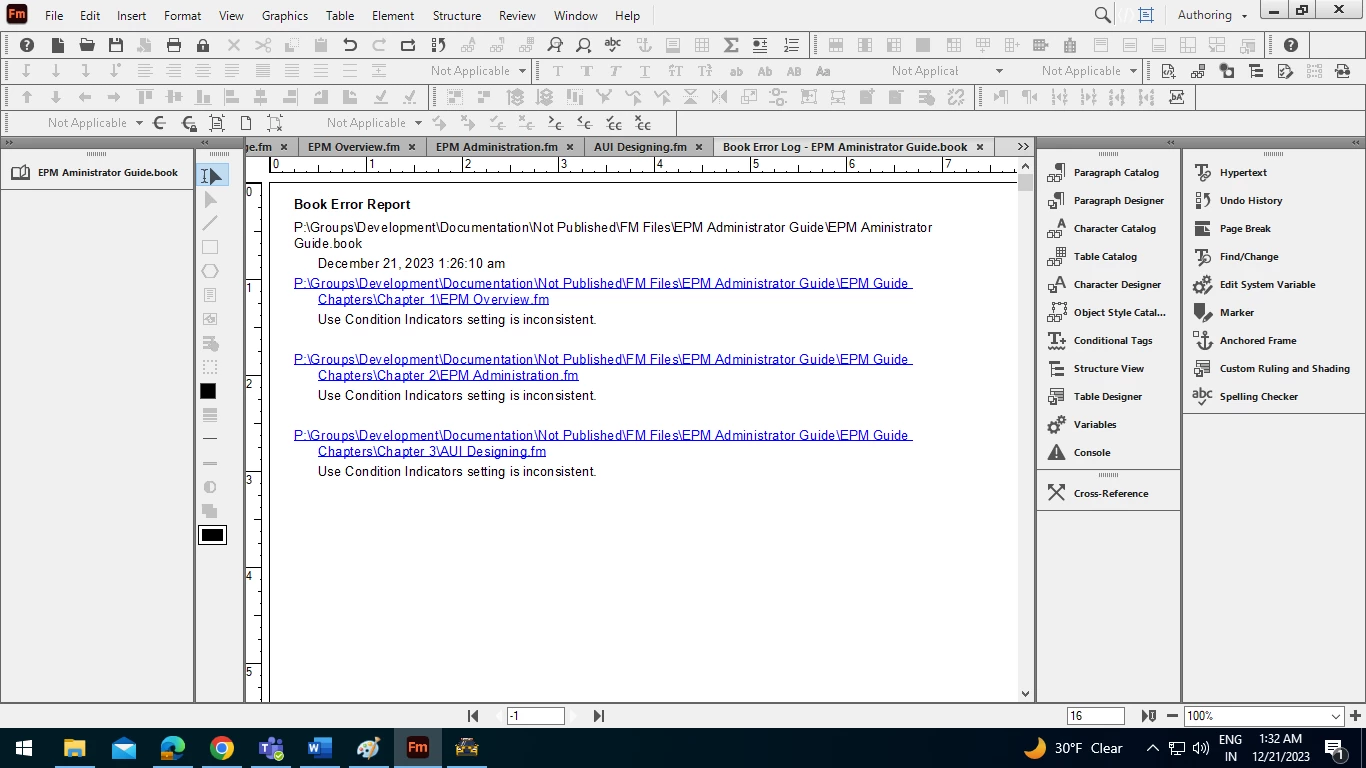
Getting book error report in FM when generating TOC

I am getting book error report when trying to generate TOC in Frame maker. Please suggest solution. I am attaching screenshot for reference.

 

    This topic is closed to new replies. Start a new post to keep the conversation going.
    Winfried RengCorrect answer
    Community Expert
    December 21, 2023

    Hi, this message just says that the settings to show or hide conditions in the single files differ from those of the first file of the book.

    It could be that this is what you want.

    If not, select all files in the book and import the condition settings from a file with the settings which you want into all other files; deselect all settings which should not imported (Files | Import Formats).

    Then update the book again.

    Best regards, Winfried

    4 replies

    Matt-Tech Comm Tools
    Community Expert
    Community Expert
    December 21, 2023

    As Winfried mentioned, FrameMaker is correctly telling you that things are inconsistent.

    If you don't want to import stuff from other files, the quickest fix is to select all the files in your book, and then choose Hide (or Show) Conditional Text Indicators as needed.


    Be sure to close the Book Error Report first, so you don't panic when you run across it later 😉


    -Matt


    Translate
    -Matt Sullivan, FrameMaker Course Creator, Author, Trainer, Consultant
    Known Participant
    December 22, 2023

    Thank you Matt.

    Translate
    Winfried RengCommunity ExpertCorrect answer
    Community Expert
    December 21, 2023

    Hi, this message just says that the settings to show or hide conditions in the single files differ from those of the first file of the book.

    It could be that this is what you want.

    If not, select all files in the book and import the condition settings from a file with the settings which you want into all other files; deselect all settings which should not imported (Files | Import Formats).

    Then update the book again.

    Best regards, Winfried

    Translate
    Known Participant
    December 21, 2023

    Thanks

    Translate