Known Participant
June 19, 2024
Question

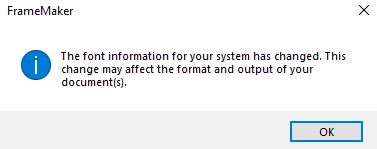
Getting the message 'font information for your system has changed' in adobe Frame Make

  • June 19, 2024
  • 2 replies
  • 755 views

I am getting this messag frequently, 'font information for your system has changed' . How can I fix this?



    This topic has been closed for replies.

    2 replies

    Bob_Niland
    Community Expert
    Community Expert
    June 19, 2024

    As Winfried related, this is caused by the current printer changing while FM has a document open. I seem to recall that there is a script available (SetPrint?) that can set the printer every time you open FM, avoiding this minor annoyance. On my system, the printer is normally set to the actual PCL laser printer at hand. I'm just in the habit of doing a
    File🞃Print Setup…
    for the specific project, usually to a PDF driver & custom page size.


    The original goal of WYSIWYG on Windows was that text processing apps would render to the screen exactly as the document would appear on the target printer. Switching to a daisywheel driver was a shocking visual experience in FM then.

    Community Expert
    June 19, 2024

    SetPrint does not run with FrameMaker 2022 any more. Pitty.

    Jeff_Coatsworth
    Community Expert
    Community Expert
    June 19, 2024

    @Winfried Reng - I've got the source code for it, but haven't found anyone yet with the bandwidth to take it on converting it to run as a 64 bit app. (plus there are issues with Patch 4 of FM2022 messing up scripts now too).

    Community Expert
    June 19, 2024

    Hi,

    This message comes up, when your printer was changed. Different printers support fonts differently.

    Therefore, always use Adobe PDF (or in some cases another PDF printer), when you create your PDFs.

    Although I think that this is only important, when you print to a PostScript file.

    When I use Save As PDF (with or without Distiller), then FrameMaker creates the PDF correctly. Also with EPS files which demand a PostScript printer. I use FrameMaker 17 and did not test on FM 16.

    Older versions without the PDF engine migh be different.

    Known Participant
    June 20, 2024

    Hi Winfried, I don't use printer on my virtual machine.

    Community Expert
    June 20, 2024

    Yes. But obviously the printer has changed.

    Possibly your virtual machine uses the printer of your regular PC.

    Which printer is shown, when you click File | Print Setup?