


Known Participant
February 10, 2010
Answered

Graphic and title vertically aligned

  • February 10, 2010
  • 4 replies
  • 604 views

I'm trying to set up graphic images with numbered titles (captions) aligned to the left of the image. I have a single column layout with a side head. I'd like the graphics to go in the column and the title to go in the left side head, vertically aligned with the top of the graphic.

My graphic title format has side head alignment and is in the right place. The anchor for the frame that holds the graphic is at the end of the title paragraph. I've tried different anchoring positions, but can't seem to get the frame in the column, vertically aligned with the title. Has anyone done this?

    This topic is closed to new replies. Start a new post to keep the conversation going.
    Correct answer Arnis Gubins

    You need to adjust the settings in the respective paratgs.

    For the Figure Caption paratag, set the Side Head-Alignment to be "Top Edge".

    For the Anchored frame in the next paratag set it to be at insertion point.

    • Having a paragraph between the graphic title and the frame, breaks the "Keep with Next" between the two, leaving the possiblitly of having the title on one page and the graphic on the next.

    The anchored frame should be in that next paratag. There shouldn't be anything in between.

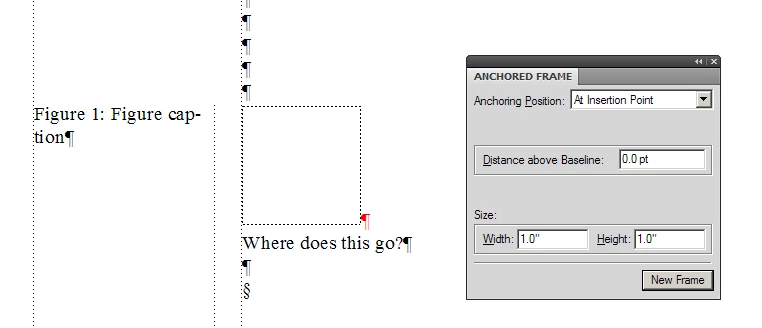
    If I follow your requirements, it looks something like this:

    4 replies

    Arnis Gubins
    Inspiring
    February 10, 2010

    Have you tried anchoring the graphic in a separate paratag instead?

    stmanAuthor
    Known Participant
    February 10, 2010

    OK, I tried that. Two issues:

    • The anchor is now in an empty paragraph "above" the graphic frame. In order to align the top of the frame with the graphic title (which is in the sidehead), I have to set the anchoring position of the frame to "Run into Paragraph", which causes wrap-around problems.

    • Having a paragraph between the graphic title and the frame, breaks the "Keep with Next" between the two, leaving the possiblitly of having the title on one page and the graphic on the next.

    Funny, I thought I'd seen this before in an FM file. Now if I could only find it to see how they they did it .

    Arnis Gubins
    Arnis GubinsCorrect answer
    Inspiring
    February 10, 2010

    You need to adjust the settings in the respective paratgs.

    For the Figure Caption paratag, set the Side Head-Alignment to be "Top Edge".

    For the Anchored frame in the next paratag set it to be at insertion point.

    • Having a paragraph between the graphic title and the frame, breaks the "Keep with Next" between the two, leaving the possiblitly of having the title on one page and the graphic on the next.

    The anchored frame should be in that next paratag. There shouldn't be anything in between.

    If I follow your requirements, it looks something like this: