
Known Participant
November 28, 2018
Answered

Graphics on reference pages not coming through into HTML

  • November 28, 2018
  • 3 replies
  • 502 views

I am using unstructured FrameMaker version 13.0.5.547. I have a chapter template with caution icon graphics included in the reference pages that are used with all our safety warnings in our documents. Why do these caution icon graphics not come through into HTML when I publish to Responsive HTML5? When I first tried doing this, the graphics were saved as PSD files in the reference pages. I changed them to PNG files because I thought HTML might play nicer with them. Didn't work.
    This topic has been closed for replies.
    Correct answer Hezy A

    Edit the Settings file

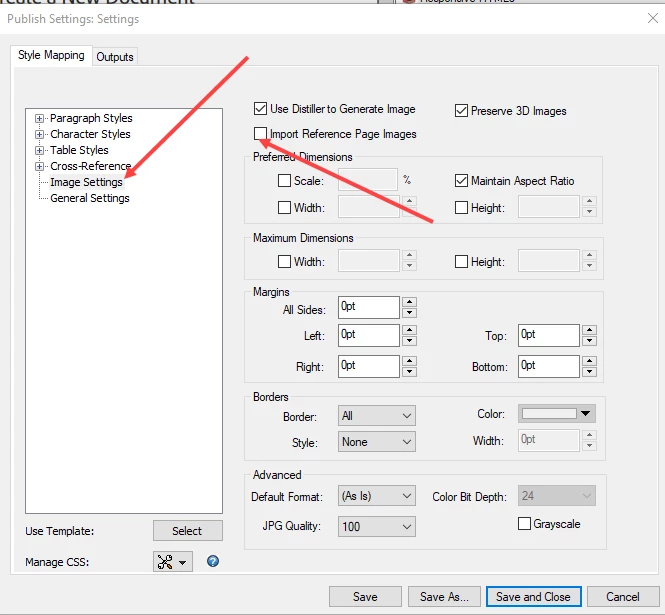
    Under Style Mapping/Image Settings there is a setting

    Import Reference page graphics

    make sure this is selected

    See if this helps

    3 replies

    Known Participant
    November 29, 2018

    This is awesome thank you!!

    Hezy A
    Hezy ACorrect answer
    Inspiring
    November 29, 2018

    Edit the Settings file

    Under Style Mapping/Image Settings there is a setting

    Import Reference page graphics

    make sure this is selected

    See if this helps

    Hezy A
    Inspiring
    November 29, 2018

    Hi

    I was looking at Frame 17, but from what i recall your version has similar settings

    Jeff_Coatsworth
    Community Expert
    Community Expert
    November 28, 2018

    IIRC there was another thread out there where it firmly stated that graphics on the reference page don't make it through to responsive HTML5.