

K.Daube
Community Expert
Community Expert
June 3, 2020
Question

Handling all book components does not select all items

  • June 3, 2020
  • 2 replies
  • 316 views

This is at least an annoyance - because I'm not certain about the consequences:

In the book window, with SHIFT held while selecting File I get options to Savel All files, open All files etc.

I have noticed that just before the operation is performed, the selection of the book components is not complete:
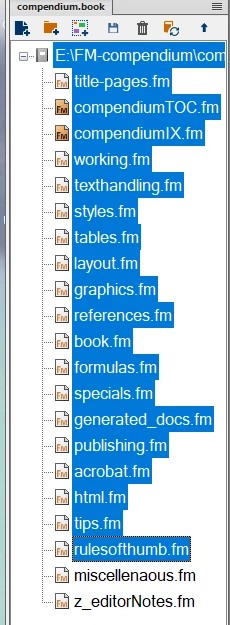
Fortunately it turns out that all book components had been saved (time stamp checked), although the last two are not selected in the book file. But the incomplete selection makes one suspicious.

Klaus


    This topic has been closed for replies.

    2 replies

    LinSims
    Community Expert
    Community Expert
    June 19, 2020

    I think you must have selected the files yourself before using the Shift + File menu. If I have just the book file selected and use Shift + File, only the book file is show as being selected but the Save All Files works as expected.


    K.Daube
    Community Expert
    K.DaubeCommunity ExpertAuthor
    Community Expert
    June 19, 2020

    Well, it turns out that all but 2 are highlighted, if I use SHIFT+Save all, SHIFT+close all for the File menu. Fortunately all are processed.