
Participating Frequently
June 3, 2024
Question

Having a LOP/LOT appear in a chapter like a mini-TOC instead generating a separate file?

  • June 3, 2024
  • 2 replies
  • 306 views

So, I inherited a file that basically has a List of Pages and List of Tables on the first page.  


You can see here that there is a chapter title, a section listing the sections, and a section listing the tables within that section.
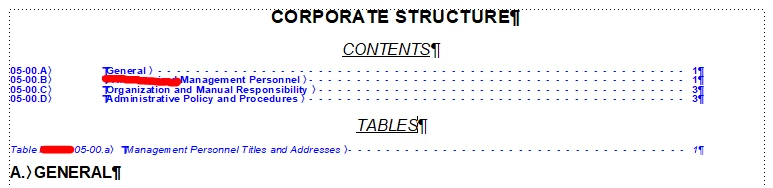
The person who had this file before me had this section set up as a text inset, but now it doesn't seem to be working.


I originally started out by making a mini-TOC to replace the section, but then I realized you can't have two mini-TOC's in the same file.  I know you can create a List of Pages and List of Tables, but those create stand alone files and won't appear at the top of the first page as before.  Is there an easy way to rectify this?


Thanks.

    This topic has been closed for replies.

    2 replies

    frameexpert
    Community Expert
    Community Expert
    June 3, 2024

    You can create a generated file from any single document. Just open the document and choose Insert and whatever kind of file you want. When you get the Attention dialog box, click Create Standalone. After the file is created and formatted how you want it, save it. Do the same with the LOT (or whatever) and save it. Now you have files that you can import as text insets at the beginning of your chapter.


    To import, choose File > Import > File, select the file make sure the Import by Reference radio button is selected.

    Jeff_Coatsworth
    Community Expert
    Community Expert
    June 3, 2024

    I would try to figure out why it's not working the way it used to. What changed between it working and now no longer working?

    Jordan_S.Author
    Participating Frequently
    June 3, 2024

    I keep getting the "Chapter 3.fm contains unresolved text insets. For information on locating them, see your user guide or online Help.


    Here's the text inset properties.  The file 03-00LOP.fm does not exist, which is why it's probably throwing the error. 


    Jeff_Coatsworth
    Community Expert
    Community Expert
    June 3, 2024

    Can you recreate it or find an old backup copy of it?