
Inspiring
March 21, 2021
Answered

Heading 1 sometimes is initial caps and sometimes uppercase in PDF

  • March 21, 2021
  • 1 reply
  • 274 views

Heading 1 sometimes is initial caps and sometimes uppercase in PDF. 
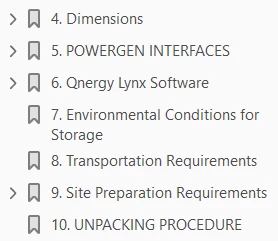
 

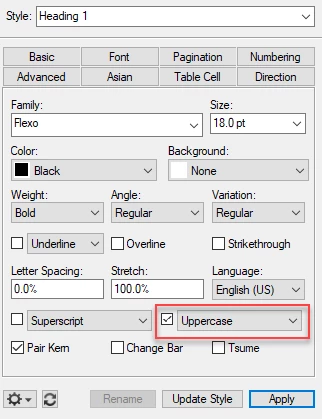
The Heading 1 designer page shows Uppercase selected. I do not see any overrides in the status bar at the bottom of the page.


    This topic has been closed for replies.
    Correct answer Barb Binder

    This is controlled by how the heads are actually typed on the body pages. If the typist used initial caps sometimes and all caps other times, this will be picked up by the bookmarks, even though you can't see it because the paragraph style is set to Uppercase. You can quickly correct these using the Ab button on the View > Toolbars > Text Formatting toolbar. Fix one or two, then publish to PDF to confirm. 


    ~Barb 

    1 reply

    Barb Binder
    Community Expert
    Barb BinderCommunity ExpertCorrect answer
    Community Expert
    March 21, 2021

    This is controlled by how the heads are actually typed on the body pages. If the typist used initial caps sometimes and all caps other times, this will be picked up by the bookmarks, even though you can't see it because the paragraph style is set to Uppercase. You can quickly correct these using the Ab button on the View > Toolbars > Text Formatting toolbar. Fix one or two, then publish to PDF to confirm. 


    ~Barb 

    ~Barb at Rocky Mountain Training
    Inspiring
    March 21, 2021

    That did the trick! Thank you.