
HELP :0) Hypertext Links drop (in Chms) - suspect chm 1st topic htm filename changed!
Currently working on updating 20+ Microsoft HTML help files (chm) for a premium product and have hit a problem with the Chm production and files I’m updating. Note: The files I’m updating, are in Adobe FrameMaker [AFM] 2017 (Version: 14.0.4.511) on a Windows 10 fully patched OS and the remaining unrevised are/were created in FM12.
My revised chms when completed and included into the build, i.e. the applications online help folder to test – fail to work, the hyperlinks (Hypertext Hrefs) don’t work and the default MS HTML Help "Cant reach this Page" is displayed. To clarify, selecting a link from an unchanged Book/Chm to a topic in one of the revised chms does not work – existing book to book links do. (Thus indicating my revised Chms are wonky..).
Initial investigation in the FM source indicated the incorrect application of Hypertext links, to other Eurotherm chms - strictly speaking (or my OCD ishh) should’ve been a Cross reference not a Hypertext_message URL ms-its:something.chm/something nnn.chm – tried the ‘purist’ internal Xref approach did not fix - so started looking deeper, thinking its not the link it’s the target i.e. the revised chm containing the updated content and .htms.
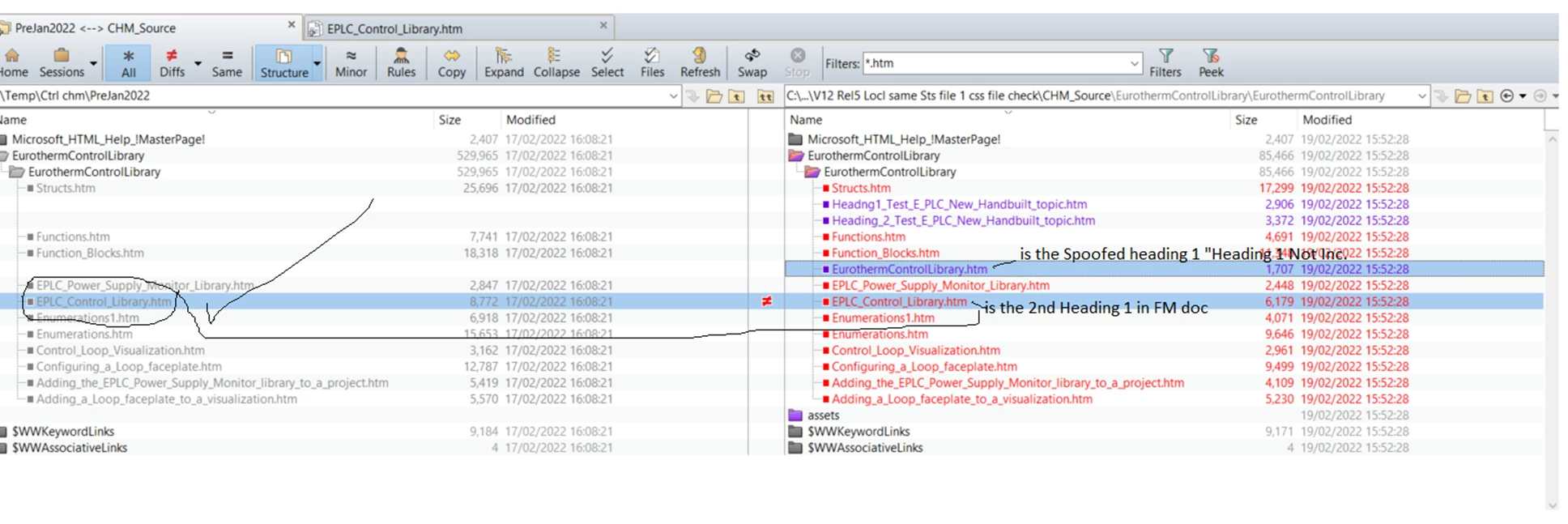
After a file comparing both the new revised version and the old 2015 versions decompiled chm files (control.chm) I was surprised to see AFM2017 was changing the 1st topics HTM filename, i.e. the FM Content heading 1 titel is: EPLC Control Library – H1 is configured in the STS file to be included into the HTML file (& CSS) - but the htm filename applied by the AFM 2017 was EurothermControlLibrary.htm – possibly a default from the AFM Book.
Now, with new enthusiasm I tested my theory (… FrameMaker Changing the first htm topic filename, from the H1 content) and spoofed up a new fake first Heading 1 in front of the original, built it and tested the links – it works and confirms the fault.
So how do I get AFM2017 to build the first topic and have the identical filename as the Heading 1 content (EPLC_Control_Library.htm), the same as the previous Chms version. (See Included file compare screenshot of spoof structure that worked).
If I cant change this behaviour, I assume I’d have edit all the links that point to the older Heading 1 htm filename to the newer versions – considerable work and time delay and not mention if it would upset any of the CSH calls & Merge/baggage functions as the Eurotherm CHM Help is a child that sits, works inside a parent Help system hence the need to build like for like a return to the same htm filename etc.
Help would be really appreciated, a fix - well you'd be a friend for life 🙂
Thanks in advance
Simon


 AdChoices