Known Participant
September 9, 2011
Answered

Help! Framemaker 10 gives fatal error when printing as PDF

  • September 9, 2011
  • 6 replies
  • 3898 views

Hello:

Framemaker 10 gives the

following fatal error when trying to Print as PDF or when tyring to Save as PDF. I have uninstalled and reloaded the Technical Suite software. My system is running XP with SP3 on a Duo Core 3.33 GB with 3.25 GB RAM. I need help! Artwitch

    This topic has been closed for replies.
    Correct answer

    Not a solution...it still won't print. This is the error I get:

    Started: Friday, September 09, 2011 at 12:13:39

    Adobe PostScript software version: 3018.101

    CID support library initialization completed.

    Adobe PDF Settings file read error in PDFX4 2008.joboptions:

    /CheckCompliance out of range

    Start Time: Friday, September 09, 2011 at 12:13:39

    Source: 1065_K-1_Print_Package.ps

    Destination: C:\Documentation\2011\Guides\2011_1065_k1_print\1065_K-1_Print_Package.pdf

    Adobe PDF Settings: C:\Documents and Settings\All Users\Application Data\Adobe\Adobe PDF\Settings\Standard.joboptions

    %%[ Error: syntaxerror; OffendingCommand: ) ]%%

    %%[ Flushing: rest of job (to end-of-file) will be ignored ]%%

    %%[ Warning: PostScript error. No PDF file produced. ] %%

    Distill Time: 00 Hour(s) : 00 Minute(s) : 00.188 Second(s)

          • End of Job ****


    As Error7103 says, the error msg you just posted indicates a Distiller error. In particular, it looks like you're using a Distiller joboption setting that could possibly be causing the Distiller error.

    Here's an older forum posting about the "PDFX" options:

    http://forums.adobe.com/message/1235968

    added link: http://forums.adobe.com/message/3795545

    Because this forum's search capability is broken, to do a forum search you have to use a "site" search engine like google, this is what you could paste in the search box:

    site:forums.adobe.com "framemaker" "pdfx4"

    Here's a similar example showing other search terms:

    6 replies

    Known Participant
    September 9, 2011

    Thank you for your responses.

    Creating a new "Standard" setting with all defaults fixed the problem.

    Michael_Müller-Hillebrand
    Legend
    September 9, 2011

    Artwitch,

    Was your version of FrameMaker 10 or TCS installed from DVD?

    If so, please repeat the installation after copying the files to a hard disk or stick. There have been reports of »incomplete« installs resulting in lots of crashes that could be healed this way.

    Apparently the Adobe installer uses the Microsft installer but they do not communicate very well with each other.

    - Michael

    Known Participant
    September 9, 2011

    Hi Michael: Frame10 was part of the Tech Comm. Suite installation that also included Acrobat Pro X. Installed and updated both this AM but still the same error. L

    Known Participant
    September 9, 2011

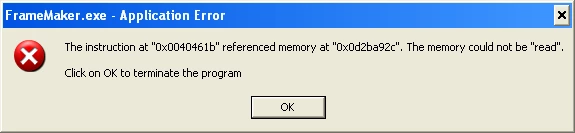
    I also get this Application Error message:

    September 9, 2011

    As a temporary solution, you might be able to print to a Postscript file and then distill the PS file.

    With the Adobe PDF printer set as your system default printer, when you do Ctl-p to print, there's a checkbox for "Print to file". When that's checked note whether there's a directory suggested (I personally like to put print files somewhere "rational" instead of in the Users or Documents and settings directory, but that's just me ...). Anyhow, note where it is going to save the file, and the name of the file. It will add the .ps, so you should only put in a different filename if you want.

    Then open a file explorer window, navigate to the directory. Try to double-click the .ps file, that should send it to Distiller. If it doesn't, then open Distiller and drag the file into the distiller window.

    Known Participant
    September 9, 2011

    Not a solution...it still won't print. This is the error I get:

    Started: Friday, September 09, 2011 at 12:13:39

    Adobe PostScript software version: 3018.101

    CID support library initialization completed.

    Adobe PDF Settings file read error in PDFX4 2008.joboptions:

    /CheckCompliance out of range

    Start Time: Friday, September 09, 2011 at 12:13:39

    Source: 1065_K-1_Print_Package.ps

    Destination: C:\Documentation\2011\Guides\2011_1065_k1_print\1065_K-1_Print_Package.pdf

    Adobe PDF Settings: C:\Documents and Settings\All Users\Application Data\Adobe\Adobe PDF\Settings\Standard.joboptions

    %%[ Error: syntaxerror; OffendingCommand: ) ]%%

    %%[ Flushing: rest of job (to end-of-file) will be ignored ]%%

    %%[ Warning: PostScript error. No PDF file produced. ] %%

    Distill Time: 00 Hour(s) : 00 Minute(s) : 00.188 Second(s)

          • End of Job ****

    Known Participant
    September 9, 2011

    No new software has been loaded,

    Yes, cold booted after reinstallation this AM.

    Known Participant
    September 9, 2011

    I also reloaded and updated Acroba X

    Pro.

    September 9, 2011

    What specific version of FM, as shown in Help > About.

    If you haven't yet done so, please check for updates here:

    Updates - Adobe - FrameMaker : For Windows

    Have you ever been able to create PDFs, or did this just start happening?

    Have you installed any other s/w recently?

    Have you rebooted your system?

    Known Participant
    September 9, 2011

    Hi: It is Version 10.0.1.402